> ## Documentation Index
> Fetch the complete documentation index at: https://docs.ghost.org/llms.txt
> Use this file to discover all available pages before exploring further.
# Recommendations
## Overview
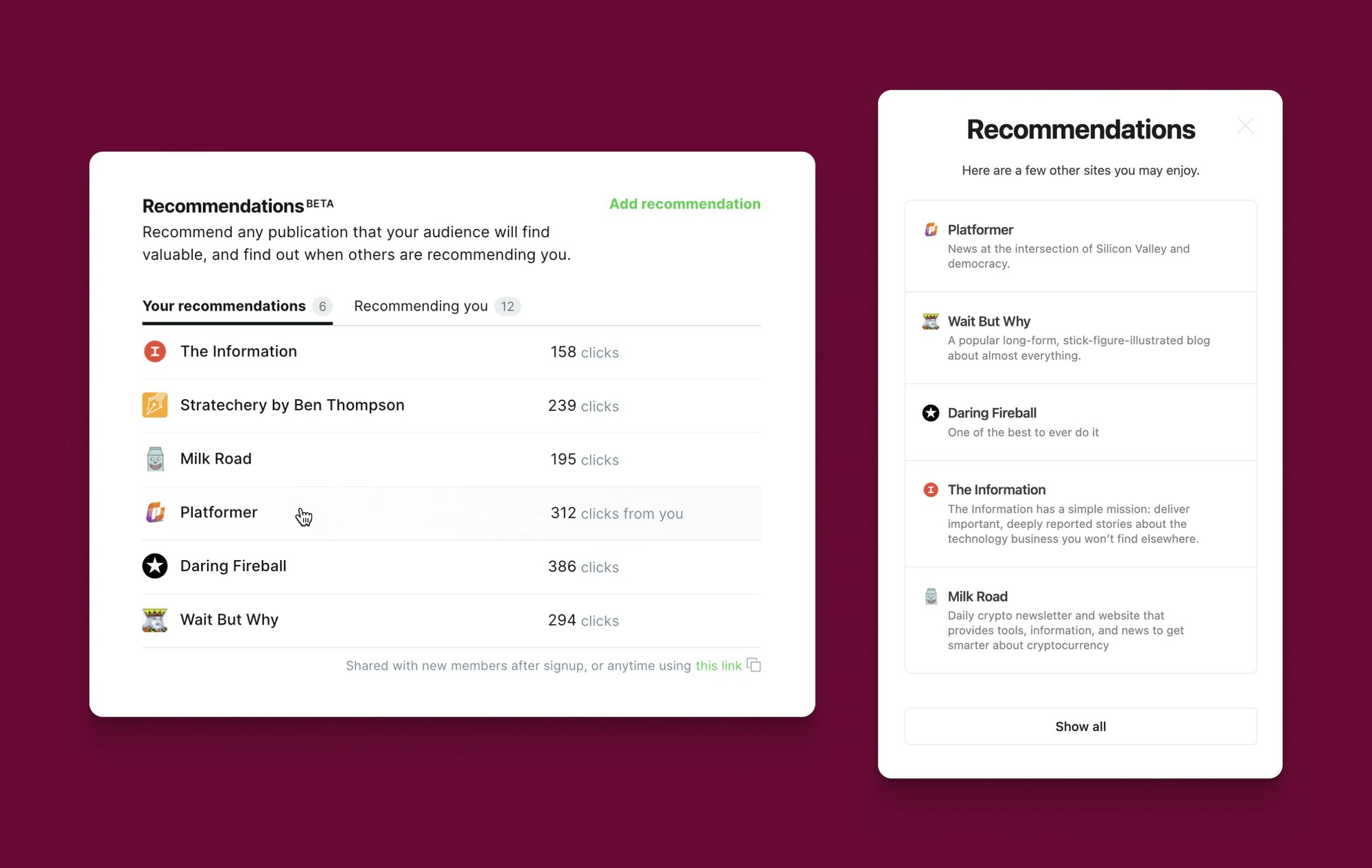
With recommendations, publishers can share their favorite sites with their readers and, likewise, be recommended by other publications. See [the Changelog](https://ghost.org/changelog/recommendations/) for an overview of this feature.
Under the hood, Ghost’s recommendations feature is built on the [Webmention open standard](https://www.w3.org/TR/webmention/), which means recommendations aren’t limited to any single platform — but extend to every site on the web!
Recommendations also make it possible for readers to subscribe to recommended publications with a single click. While this feature is currently exclusive to Ghost sites, we are eager to help other platforms in implementing this 1-click functionality. Contact us if you’re interested in building 1-click subscriptions for the open web!
The sections below provide a high-level technical summary of how recommendations work.
## See your site’s recommendations
* The recommendations modal is shown automatically whenever a new member subscribes to a Ghost publication.
* Visiting `https://yoursite.com/#/portal/recommendations` will open the recommendations modal. Use this URL as a link in the navigation menu to create a recommendation button.
* See additional methods for opening the recommendations modal in our [theme docs](/themes/helpers/data/recommendations/).
## How Ghost sends a recommendation
When you make a recommendation, it shows on your website and in Portal at `yoursite.com/#/portal/recommendations`. Behind the scenes, Ghost performs the following steps:
1. Ghost checks to see if the recommended site has Webmentions enabled. While it’s possible to recommend any site, Ghost only notifies sites about your recommendation if they have a Webmention endpoint that can receive it.
2. Ghost adds the recommendation to your site’s `/.well-known/recommendations.json` file. Here’s an example of this file:
```json theme={"dark"}
[
{
"url": "https://shesabeast.co/",
"updated_at": "2023-09-22T14:09:32.000Z",
"created_at": "2023-09-22T14:09:32.000Z"
},
{
"url": "https://makerstations.io/",
"updated_at": "2023-09-22T14:12:40.000Z",
"created_at": "2023-09-22T14:12:34.000Z"
}
]
```
3. Ghost notifies the recommended site via a Webmention. This takes the form of a POST request to the endpoint discovered in step 1 and contains a reference to your site’s `recommendations.json` file. Here’s an example of a request:
```http theme={"dark"}
POST /webmentions/receive/ HTTP/1.1
Host: recommendedsite.com
Content-Type: application/x-www-form-urlencoded
source=https://mysite.com/.well-known/recommendations.json&
target=https://recommendedsite.com/
HTTP/1.1 202 Accepted
```
## How Ghost receives a recommendation
Your site receives recommendations in the same way as described above but as the recipient.
1. Ghost automatically adds a `link` tag to your publication to inform other sites about your Webmention endpoint. That tag looks like this:
```html theme={"dark"}
```
2. Ghost listens for Webmentions on this endpoint. Once the incoming recommendation is verified, it’s added to Ghost Admin and you receive a notification.
## Updates and removals
If you update or remove a recommended site, Ghost sends an updated Webmention about the change. Likewise, your site will be automatically updated whenever it receives an incoming recommendation change.
## Theme support
Theme developers can extend the recommendation feature by using the [`recommendations`](/themes/helpers/data/recommendations/) and [`readable_url`](/themes/helpers/data/readable_url/) helpers. See the documentation for these features to learn more.
 Under the hood, Ghost’s recommendations feature is built on the [Webmention open standard](https://www.w3.org/TR/webmention/), which means recommendations aren’t limited to any single platform — but extend to every site on the web!
Recommendations also make it possible for readers to subscribe to recommended publications with a single click. While this feature is currently exclusive to Ghost sites, we are eager to help other platforms in implementing this 1-click functionality. Contact us if you’re interested in building 1-click subscriptions for the open web!
The sections below provide a high-level technical summary of how recommendations work.
## See your site’s recommendations
* The recommendations modal is shown automatically whenever a new member subscribes to a Ghost publication.
* Visiting `https://yoursite.com/#/portal/recommendations` will open the recommendations modal. Use this URL as a link in the navigation menu to create a recommendation button.
* See additional methods for opening the recommendations modal in our [theme docs](/themes/helpers/data/recommendations/).
## How Ghost sends a recommendation
When you make a recommendation, it shows on your website and in Portal at `yoursite.com/#/portal/recommendations`. Behind the scenes, Ghost performs the following steps:
1. Ghost checks to see if the recommended site has Webmentions enabled. While it’s possible to recommend any site, Ghost only notifies sites about your recommendation if they have a Webmention endpoint that can receive it.
2. Ghost adds the recommendation to your site’s `/.well-known/recommendations.json` file. Here’s an example of this file:
```json theme={"dark"}
[
{
"url": "https://shesabeast.co/",
"updated_at": "2023-09-22T14:09:32.000Z",
"created_at": "2023-09-22T14:09:32.000Z"
},
{
"url": "https://makerstations.io/",
"updated_at": "2023-09-22T14:12:40.000Z",
"created_at": "2023-09-22T14:12:34.000Z"
}
]
```
3. Ghost notifies the recommended site via a Webmention. This takes the form of a POST request to the endpoint discovered in step 1 and contains a reference to your site’s `recommendations.json` file. Here’s an example of a request:
```http theme={"dark"}
POST /webmentions/receive/ HTTP/1.1
Host: recommendedsite.com
Content-Type: application/x-www-form-urlencoded
source=https://mysite.com/.well-known/recommendations.json&
target=https://recommendedsite.com/
HTTP/1.1 202 Accepted
```
## How Ghost receives a recommendation
Your site receives recommendations in the same way as described above but as the recipient.
1. Ghost automatically adds a `link` tag to your publication to inform other sites about your Webmention endpoint. That tag looks like this:
```html theme={"dark"}
```
2. Ghost listens for Webmentions on this endpoint. Once the incoming recommendation is verified, it’s added to Ghost Admin and you receive a notification.
## Updates and removals
If you update or remove a recommended site, Ghost sends an updated Webmention about the change. Likewise, your site will be automatically updated whenever it receives an incoming recommendation change.
## Theme support
Theme developers can extend the recommendation feature by using the [`recommendations`](/themes/helpers/data/recommendations/) and [`readable_url`](/themes/helpers/data/readable_url/) helpers. See the documentation for these features to learn more.
Under the hood, Ghost’s recommendations feature is built on the [Webmention open standard](https://www.w3.org/TR/webmention/), which means recommendations aren’t limited to any single platform — but extend to every site on the web!
Recommendations also make it possible for readers to subscribe to recommended publications with a single click. While this feature is currently exclusive to Ghost sites, we are eager to help other platforms in implementing this 1-click functionality. Contact us if you’re interested in building 1-click subscriptions for the open web!
The sections below provide a high-level technical summary of how recommendations work.
## See your site’s recommendations
* The recommendations modal is shown automatically whenever a new member subscribes to a Ghost publication.
* Visiting `https://yoursite.com/#/portal/recommendations` will open the recommendations modal. Use this URL as a link in the navigation menu to create a recommendation button.
* See additional methods for opening the recommendations modal in our [theme docs](/themes/helpers/data/recommendations/).
## How Ghost sends a recommendation
When you make a recommendation, it shows on your website and in Portal at `yoursite.com/#/portal/recommendations`. Behind the scenes, Ghost performs the following steps:
1. Ghost checks to see if the recommended site has Webmentions enabled. While it’s possible to recommend any site, Ghost only notifies sites about your recommendation if they have a Webmention endpoint that can receive it.
2. Ghost adds the recommendation to your site’s `/.well-known/recommendations.json` file. Here’s an example of this file:
```json theme={"dark"}
[
{
"url": "https://shesabeast.co/",
"updated_at": "2023-09-22T14:09:32.000Z",
"created_at": "2023-09-22T14:09:32.000Z"
},
{
"url": "https://makerstations.io/",
"updated_at": "2023-09-22T14:12:40.000Z",
"created_at": "2023-09-22T14:12:34.000Z"
}
]
```
3. Ghost notifies the recommended site via a Webmention. This takes the form of a POST request to the endpoint discovered in step 1 and contains a reference to your site’s `recommendations.json` file. Here’s an example of a request:
```http theme={"dark"}
POST /webmentions/receive/ HTTP/1.1
Host: recommendedsite.com
Content-Type: application/x-www-form-urlencoded
source=https://mysite.com/.well-known/recommendations.json&
target=https://recommendedsite.com/
HTTP/1.1 202 Accepted
```
## How Ghost receives a recommendation
Your site receives recommendations in the same way as described above but as the recipient.
1. Ghost automatically adds a `link` tag to your publication to inform other sites about your Webmention endpoint. That tag looks like this:
```html theme={"dark"}
```
2. Ghost listens for Webmentions on this endpoint. Once the incoming recommendation is verified, it’s added to Ghost Admin and you receive a notification.
## Updates and removals
If you update or remove a recommended site, Ghost sends an updated Webmention about the change. Likewise, your site will be automatically updated whenever it receives an incoming recommendation change.
## Theme support
Theme developers can extend the recommendation feature by using the [`recommendations`](/themes/helpers/data/recommendations/) and [`readable_url`](/themes/helpers/data/readable_url/) helpers. See the documentation for these features to learn more.