> ## Documentation Index
> Fetch the complete documentation index at: https://docs.ghost.org/llms.txt
> Use this file to discover all available pages before exploring further.
# Migrating from BeeHiiv
> Migrate from BeeHiiv and import your content to Ghost with this guide
## **Run the migration**
The beehiiv migrator allows you to quickly import content and members from your beehiiv to your Ghost publication. You can access the migrator tool from the **Settings → Advanced →** **Import/Export** area of Ghost Admin.
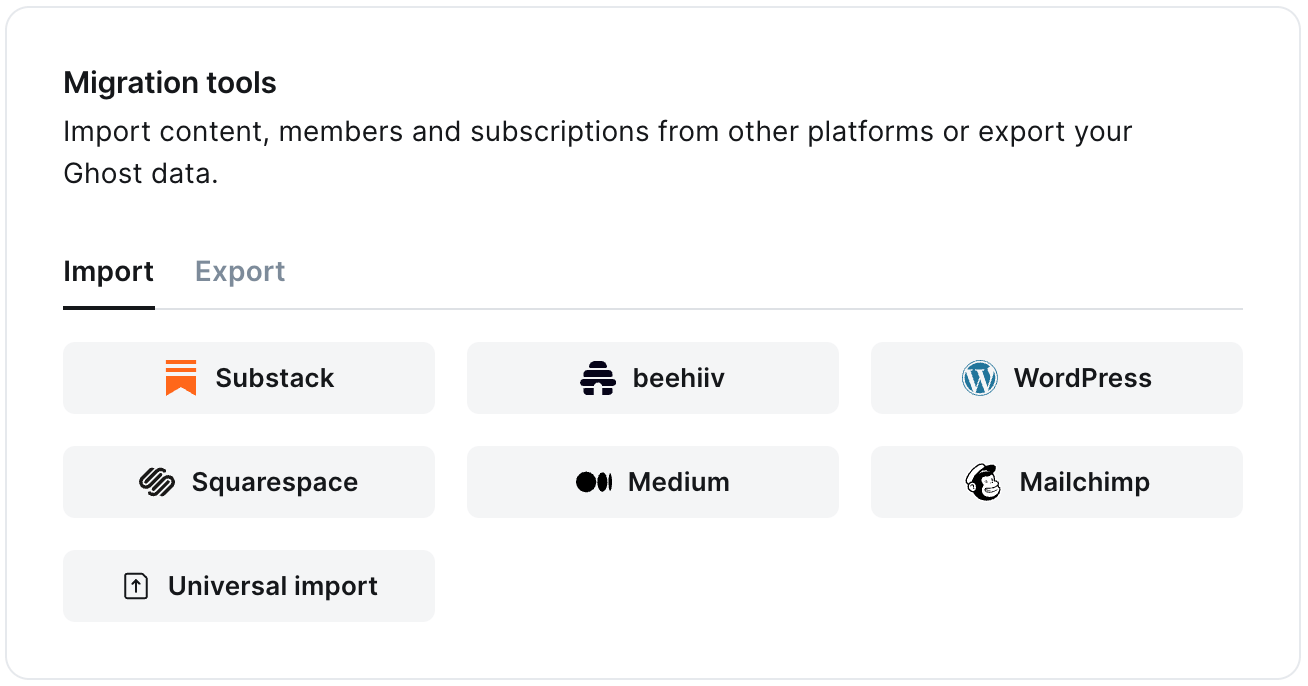 It's helpful to log in to your beehiiv account before running the migration in Ghost Admin.
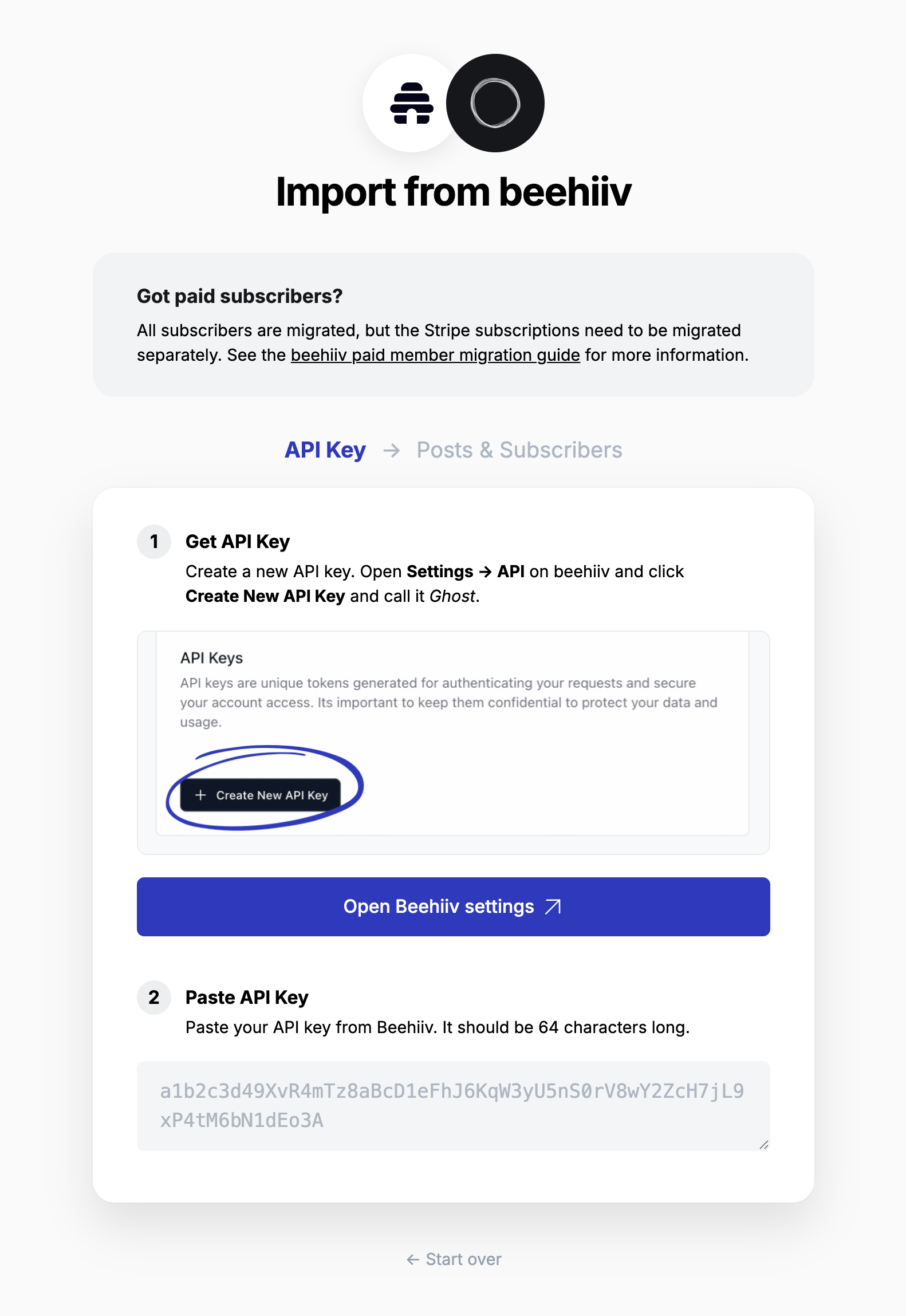
### **1. Enter your beehiiv API key**
To start the migration process, create an API key & paste it into the text box, and click **Continue**.
It's helpful to log in to your beehiiv account before running the migration in Ghost Admin.
### **1. Enter your beehiiv API key**
To start the migration process, create an API key & paste it into the text box, and click **Continue**.
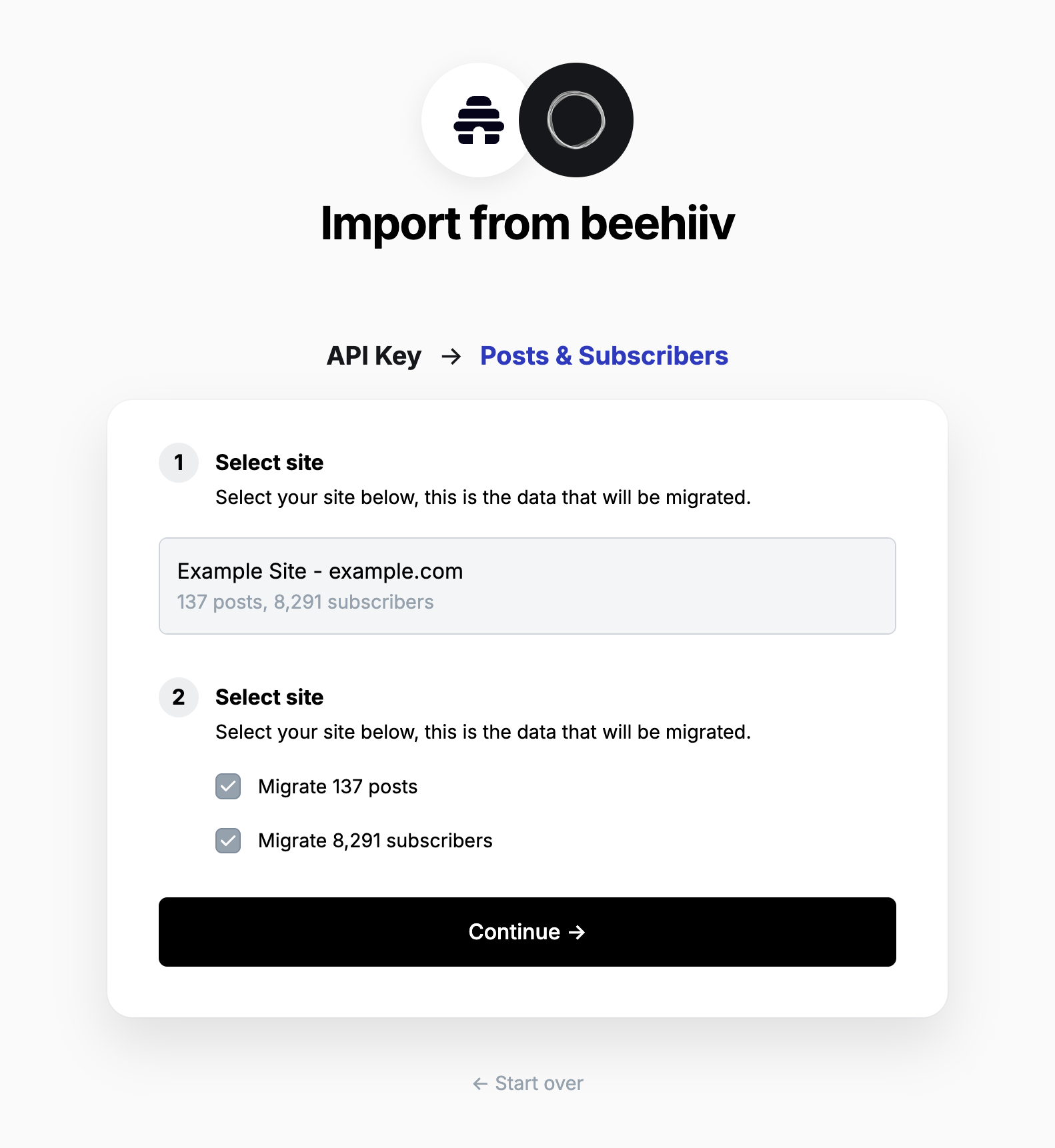
 ### **2. Select site**
Any sites you have in your beehiiv account will be listed here. Select the site you want to migrate from. If you only have one site, it is preselected.
Select if you want to migrate posts and/or subscribers, then click **Continue**.
### **2. Select site**
Any sites you have in your beehiiv account will be listed here. Select the site you want to migrate from. If you only have one site, it is preselected.
Select if you want to migrate posts and/or subscribers, then click **Continue**.
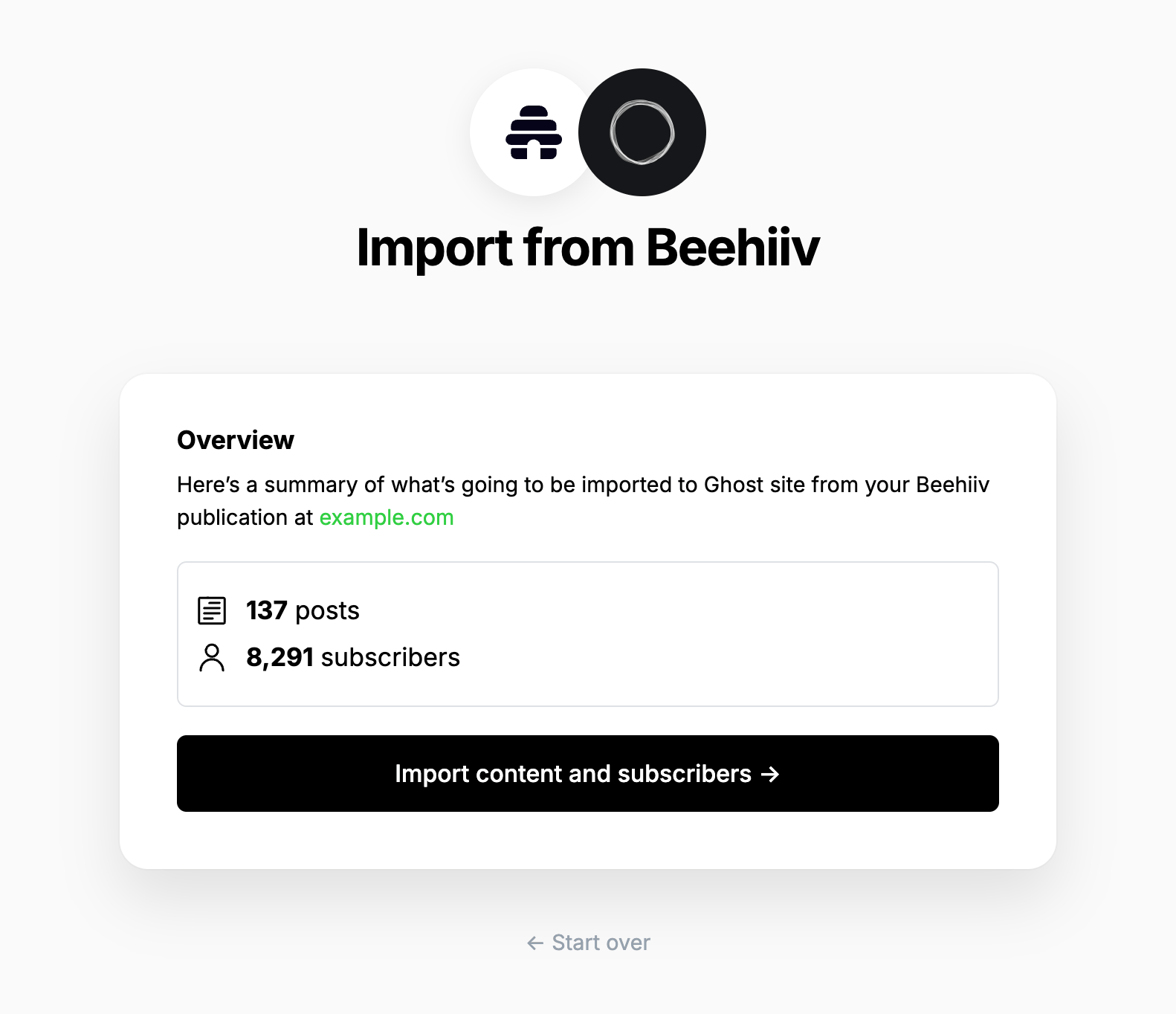
 ### **3. Review**
Ghost will confirm the number of posts and members that will be imported to your publication. If satisfied, click **Import content and subscribers** to begin the import of your data.
### **3. Review**
Ghost will confirm the number of posts and members that will be imported to your publication. If satisfied, click **Import content and subscribers** to begin the import of your data.
 After a few moments, you'll see a confirmation message, confirming that your data was successfully migrated to your Ghost site.
### **Statement descriptor**
The statement descriptor is what's shown on bank statements, and depending on how the account was set up, might include 'beehiiv' in the name. We recommend updating this in your [Stripe public details settings](https://dashboard.stripe.com/settings/update/public/support-details).
### **Using custom domains**
If you’re using a custom domain on beehiiv, you’ll need to implement redirects in Ghost to prevent broken links.
beehiiv uses `/p/` as part of the public post URL, where as Ghost uses it in the URL for post previews. This means the redirect regular expression is quite complex, but necessary so that post previews in Ghost function correctly.
```yaml theme={"dark"}
# redirects.yaml
301:
^\/p\/(?![0-9a-fA-F]{8}-[0-9a-fA-F]{4}-[0-9a-fA-F]{4}-[0-9a-fA-F]{4}-[0-9a-fA-F]{12})(.*): /$1
^\/polls\/[0-9a-fA-F]{8}-[0-9a-fA-F]{4}-[0-9a-fA-F]{4}-[0-9a-fA-F]{4}-[0-9a-fA-F]{12}(.*): /
^\/t\/(.*): /tag/$1
302:
```
This means that if a visitor or crawler goes to `https://mysite.com/p/awesome-post`, they will automatically be redirected to `https://mysite.com/awesome-post`.
For more information on beehiiv redirects, visit our guide [here](https://ghost.org/tutorials/implementing-redirects/#beehiiv).
## Paid Subscriptions
The Stripe account associated with a beehiiv site cannot be used or connected to any other platform, therefore paid subscribers cannot easily be migrated from beehiiv to Ghost. However, it is possible to migrate customer data and subscriptions from one Stripe account to another account, which can be used with Ghost.
If you're a **Ghost(Pro) customer**, our Migrations team can support you in migrating your content and subscribers. Learn more and get in touch with the team [here](https://ghost.org/concierge/).
If you're self-hosting Ghost, or a developer comfortable with using the command line, you can use our open-source migration tools to migrate customers and subscriptions from one Stripe account to another. You can find the tools and documentation for this process [here](https://github.com/TryGhost/migrate/tree/main/packages/mg-stripe).
## Large and Complex migrations
If your migration needs go beyond what our in-built migration tools can support you can still move to Ghost.
If you're a **Ghost(Pro) customer**, our Migrations team can support you in migrating your content and subscribers. Learn more and get in touch with the team [here](https://ghost.org/concierge/).
Alternatively, if you are a developer, comfortable with using the command line, or running a self-hosted Ghost instance, we have a suite of[ open-source migration tools ](https://github.com/TryGhost/migrate)to help with large, complex and custom migrations.
After a few moments, you'll see a confirmation message, confirming that your data was successfully migrated to your Ghost site.
### **Statement descriptor**
The statement descriptor is what's shown on bank statements, and depending on how the account was set up, might include 'beehiiv' in the name. We recommend updating this in your [Stripe public details settings](https://dashboard.stripe.com/settings/update/public/support-details).
### **Using custom domains**
If you’re using a custom domain on beehiiv, you’ll need to implement redirects in Ghost to prevent broken links.
beehiiv uses `/p/` as part of the public post URL, where as Ghost uses it in the URL for post previews. This means the redirect regular expression is quite complex, but necessary so that post previews in Ghost function correctly.
```yaml theme={"dark"}
# redirects.yaml
301:
^\/p\/(?![0-9a-fA-F]{8}-[0-9a-fA-F]{4}-[0-9a-fA-F]{4}-[0-9a-fA-F]{4}-[0-9a-fA-F]{12})(.*): /$1
^\/polls\/[0-9a-fA-F]{8}-[0-9a-fA-F]{4}-[0-9a-fA-F]{4}-[0-9a-fA-F]{4}-[0-9a-fA-F]{12}(.*): /
^\/t\/(.*): /tag/$1
302:
```
This means that if a visitor or crawler goes to `https://mysite.com/p/awesome-post`, they will automatically be redirected to `https://mysite.com/awesome-post`.
For more information on beehiiv redirects, visit our guide [here](https://ghost.org/tutorials/implementing-redirects/#beehiiv).
## Paid Subscriptions
The Stripe account associated with a beehiiv site cannot be used or connected to any other platform, therefore paid subscribers cannot easily be migrated from beehiiv to Ghost. However, it is possible to migrate customer data and subscriptions from one Stripe account to another account, which can be used with Ghost.
If you're a **Ghost(Pro) customer**, our Migrations team can support you in migrating your content and subscribers. Learn more and get in touch with the team [here](https://ghost.org/concierge/).
If you're self-hosting Ghost, or a developer comfortable with using the command line, you can use our open-source migration tools to migrate customers and subscriptions from one Stripe account to another. You can find the tools and documentation for this process [here](https://github.com/TryGhost/migrate/tree/main/packages/mg-stripe).
## Large and Complex migrations
If your migration needs go beyond what our in-built migration tools can support you can still move to Ghost.
If you're a **Ghost(Pro) customer**, our Migrations team can support you in migrating your content and subscribers. Learn more and get in touch with the team [here](https://ghost.org/concierge/).
Alternatively, if you are a developer, comfortable with using the command line, or running a self-hosted Ghost instance, we have a suite of[ open-source migration tools ](https://github.com/TryGhost/migrate)to help with large, complex and custom migrations.