{post.title}
{post.primary_author?.name} {post.published_at ? ` / ${new Date(post.published_at).toLocaleDateString()}` : null}
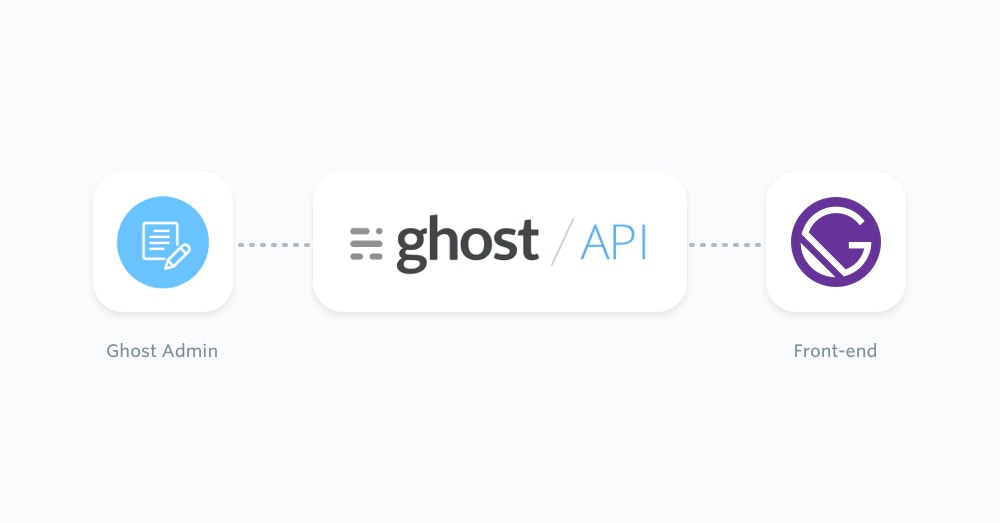 ## Gatsby and Ghost
Gatsby works well with Ghost when Ghost is the CMS and Gatsby is the static front-end. Editors keep writing in Ghost Admin. Gatsby reads published content from the [Content API](/content-api/) at build time, then creates pages from that content.
For most Gatsby sites, use the official [JavaScript Content API client](/content-api/javascript/). It is maintained as part of the [TryGhost SDK](https://github.com/TryGhost/SDK) and works in Node.js during Gatsby builds.
Use the [Admin API](/admin-api/) only in private server-side code, such as an import script or publishing workflow. Do not expose an Admin API key in Gatsby browser code.
## Prerequisites
This configuration requires basic knowledge of JavaScript and React. You will also need:
* A running Ghost site, either self-hosted or on [Ghost(Pro)](https://ghost.org/pricing/)
* A custom integration in Ghost Admin so you can copy the Content API URL and key
* A Gatsby project
Create the Content API key from **Settings -> Integrations** in Ghost Admin. For more detail, see [Content API authentication](/content-api/#authentication).
## Start from a new Gatsby site
If you already have a Gatsby site, skip to the Content API setup. Otherwise, create a new Gatsby project with the current Gatsby tooling:
```bash theme={"dark"}
npm init gatsby my-gatsby-site
cd my-gatsby-site
npm run develop
```
Gatsby also documents manual setup in the [official Gatsby docs](https://www.gatsbyjs.com/docs/).
## Install the Ghost Content API client
Install the Ghost Content API client in the Gatsby project:
```bash theme={"dark"}
npm install @tryghost/content-api dotenv
```
Add your Ghost credentials to Gatsby environment files. Keep these files out of source control.
```bash theme={"dark"}
# .env.development
GHOST_API_URL=https://demo.ghost.io
GHOST_CONTENT_API_KEY=22444f78447824223cefc48062
GHOST_API_VERSION=v6.0
SITE_URL=http://localhost:8000
# .env.production
GHOST_API_URL=https://your-site.example.com
GHOST_CONTENT_API_KEY=your_content_api_key
GHOST_API_VERSION=v6.0
SITE_URL=https://www.example.com
```
For Ghost(Pro), the URL is usually your `.ghost.io` URL. For self-hosted Ghost, use the public URL for your Ghost install.
Gatsby loads `.env.development` and `.env.production`, but Gatsby's Node APIs need `dotenv` to be configured in `gatsby-config.js`:
```js theme={"dark"}
// gatsby-config.js
require("dotenv").config({
path: `.env.${process.env.NODE_ENV || "development"}`,
});
module.exports = {
siteMetadata: {
siteUrl: process.env.SITE_URL || process.env.GHOST_API_URL,
},
};
```
## Fetch all posts during the Gatsby build
Gatsby runs `gatsby-node.js` during builds. Use it to fetch Ghost posts and pages, then create static pages from that content.
```js theme={"dark"}
// gatsby-node.js
const path = require("path");
const GhostContentAPI = require("@tryghost/content-api");
const api = new GhostContentAPI({
url: process.env.GHOST_API_URL,
key: process.env.GHOST_CONTENT_API_KEY,
version: process.env.GHOST_API_VERSION || "v6.0",
});
async function browseAll(resource, options = {}) {
const items = [];
let page = 1;
while (page) {
const response = await resource.browse({
...options,
limit: 100,
page,
});
items.push(...response);
page = response.meta.pagination.next || null;
}
return items;
}
function ghostPath(resource) {
return new URL(resource.url).pathname;
}
exports.createPages = async ({ actions, reporter }) => {
const { createPage } = actions;
const postTemplate = path.resolve("./src/templates/post.js");
const pageTemplate = path.resolve("./src/templates/page.js");
const [posts, pages] = await Promise.all([
browseAll(api.posts, {
include: "tags,authors",
order: "published_at DESC",
}),
browseAll(api.pages, {
include: "tags,authors",
}),
]);
posts.forEach((post) => {
createPage({
path: ghostPath(post),
component: postTemplate,
context: { post },
});
});
pages.forEach((page) => {
createPage({
path: ghostPath(page),
component: pageTemplate,
context: { page },
});
});
reporter.info(`Created ${posts.length} Ghost posts and ${pages.length} Ghost pages`);
};
```
Ghost 6.0 and later limit each browse request to 100 records, so static builds need pagination. The helper above follows the `meta.pagination.next` value until there are no more pages. See [pagination for building static sites](/jamstack/#pagination-for-building-static-sites) and [Content API pagination](/content-api/pagination) for the underlying API behavior.
## Render a post template
Create a Gatsby template that reads the Ghost post from `pageContext`.
```jsx theme={"dark"}
// src/templates/post.js
import * as React from "react";
export default function GhostPost({ pageContext }) {
const { post } = pageContext;
return (
## Gatsby and Ghost
Gatsby works well with Ghost when Ghost is the CMS and Gatsby is the static front-end. Editors keep writing in Ghost Admin. Gatsby reads published content from the [Content API](/content-api/) at build time, then creates pages from that content.
For most Gatsby sites, use the official [JavaScript Content API client](/content-api/javascript/). It is maintained as part of the [TryGhost SDK](https://github.com/TryGhost/SDK) and works in Node.js during Gatsby builds.
Use the [Admin API](/admin-api/) only in private server-side code, such as an import script or publishing workflow. Do not expose an Admin API key in Gatsby browser code.
## Prerequisites
This configuration requires basic knowledge of JavaScript and React. You will also need:
* A running Ghost site, either self-hosted or on [Ghost(Pro)](https://ghost.org/pricing/)
* A custom integration in Ghost Admin so you can copy the Content API URL and key
* A Gatsby project
Create the Content API key from **Settings -> Integrations** in Ghost Admin. For more detail, see [Content API authentication](/content-api/#authentication).
## Start from a new Gatsby site
If you already have a Gatsby site, skip to the Content API setup. Otherwise, create a new Gatsby project with the current Gatsby tooling:
```bash theme={"dark"}
npm init gatsby my-gatsby-site
cd my-gatsby-site
npm run develop
```
Gatsby also documents manual setup in the [official Gatsby docs](https://www.gatsbyjs.com/docs/).
## Install the Ghost Content API client
Install the Ghost Content API client in the Gatsby project:
```bash theme={"dark"}
npm install @tryghost/content-api dotenv
```
Add your Ghost credentials to Gatsby environment files. Keep these files out of source control.
```bash theme={"dark"}
# .env.development
GHOST_API_URL=https://demo.ghost.io
GHOST_CONTENT_API_KEY=22444f78447824223cefc48062
GHOST_API_VERSION=v6.0
SITE_URL=http://localhost:8000
# .env.production
GHOST_API_URL=https://your-site.example.com
GHOST_CONTENT_API_KEY=your_content_api_key
GHOST_API_VERSION=v6.0
SITE_URL=https://www.example.com
```
For Ghost(Pro), the URL is usually your `.ghost.io` URL. For self-hosted Ghost, use the public URL for your Ghost install.
Gatsby loads `.env.development` and `.env.production`, but Gatsby's Node APIs need `dotenv` to be configured in `gatsby-config.js`:
```js theme={"dark"}
// gatsby-config.js
require("dotenv").config({
path: `.env.${process.env.NODE_ENV || "development"}`,
});
module.exports = {
siteMetadata: {
siteUrl: process.env.SITE_URL || process.env.GHOST_API_URL,
},
};
```
## Fetch all posts during the Gatsby build
Gatsby runs `gatsby-node.js` during builds. Use it to fetch Ghost posts and pages, then create static pages from that content.
```js theme={"dark"}
// gatsby-node.js
const path = require("path");
const GhostContentAPI = require("@tryghost/content-api");
const api = new GhostContentAPI({
url: process.env.GHOST_API_URL,
key: process.env.GHOST_CONTENT_API_KEY,
version: process.env.GHOST_API_VERSION || "v6.0",
});
async function browseAll(resource, options = {}) {
const items = [];
let page = 1;
while (page) {
const response = await resource.browse({
...options,
limit: 100,
page,
});
items.push(...response);
page = response.meta.pagination.next || null;
}
return items;
}
function ghostPath(resource) {
return new URL(resource.url).pathname;
}
exports.createPages = async ({ actions, reporter }) => {
const { createPage } = actions;
const postTemplate = path.resolve("./src/templates/post.js");
const pageTemplate = path.resolve("./src/templates/page.js");
const [posts, pages] = await Promise.all([
browseAll(api.posts, {
include: "tags,authors",
order: "published_at DESC",
}),
browseAll(api.pages, {
include: "tags,authors",
}),
]);
posts.forEach((post) => {
createPage({
path: ghostPath(post),
component: postTemplate,
context: { post },
});
});
pages.forEach((page) => {
createPage({
path: ghostPath(page),
component: pageTemplate,
context: { page },
});
});
reporter.info(`Created ${posts.length} Ghost posts and ${pages.length} Ghost pages`);
};
```
Ghost 6.0 and later limit each browse request to 100 records, so static builds need pagination. The helper above follows the `meta.pagination.next` value until there are no more pages. See [pagination for building static sites](/jamstack/#pagination-for-building-static-sites) and [Content API pagination](/content-api/pagination) for the underlying API behavior.
## Render a post template
Create a Gatsby template that reads the Ghost post from `pageContext`.
```jsx theme={"dark"}
// src/templates/post.js
import * as React from "react";
export default function GhostPost({ pageContext }) {
const { post } = pageContext;
return (
{post.primary_author?.name} {post.published_at ? ` / ${new Date(post.published_at).toLocaleDateString()}` : null}
This draft was created through the Admin API.
", status: "draft", }, { source: "html" } ); ``` Run Admin API scripts on your own machine, in CI, or on a server. Never ship `GHOST_ADMIN_API_KEY` to the browser. ## Next steps Read the [Content API JavaScript client](/content-api/javascript/) docs for available endpoints and options. Gatsby's [Node API documentation](https://www.gatsbyjs.com/docs/reference/config-files/gatsby-node/) explains how `createPages` and `sourceNodes` fit into the Gatsby build. Gatsby output is static, so new Ghost content appears after the next Gatsby build. Most hosting providers let you trigger a rebuild from a Ghost webhook or build hook.