> ## Documentation Index
> Fetch the complete documentation index at: https://docs.ghost.org/llms.txt
> Use this file to discover all available pages before exploring further.
# Content API JavaScript Client
> Ghost provides a flexible promise-based JavaScript library for accessing the Content API. The library can be used in any JavaScript project, client or server side and abstracts away all the pain points of working with API data.
***
## Working Example
```js theme={"dark"}
const api = new GhostContentAPI({
url: 'https://demo.ghost.io',
key: '22444f78447824223cefc48062',
version: "v6.0"
});
// fetch 5 posts, including related tags and authors
api.posts
.browse({limit: 5, include: 'tags,authors'})
.then((posts) => {
posts.forEach((post) => {
console.log(post.title);
});
})
.catch((err) => {
console.error(err);
});
```
## Authentication
The client requires the host address of your Ghost API and a Content API key in order to authenticate.
The version string is optional, and indicates the minimum version of Ghost your integration can work with.
The Content API URL and key can be obtained by creating a new `Custom Integration` under the **Integrations** screen in Ghost Admin.
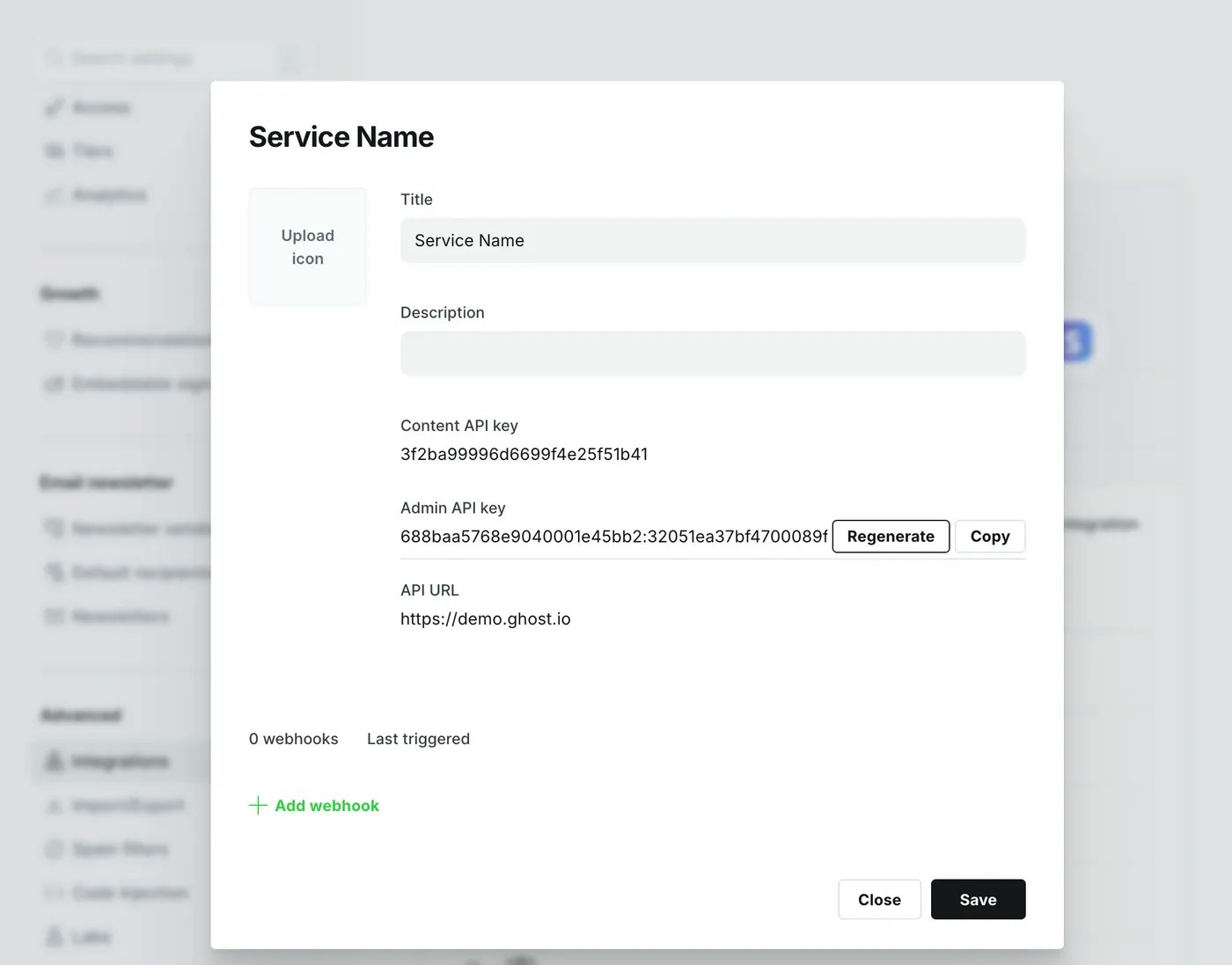 * `url` - API domain, must not end in a trailing slash.
* `key` - hex string copied from the “Integrations” screen in Ghost Admin
* `version` - should be set to ‘v6.0’
See the documentation on [Content API authentication](/content-api/#authentication) for more explanation.
## Endpoints
All endpoints & parameters provided by the [Content API](/content-api/) are supported.
```js theme={"dark"}
// Browsing posts returns Promise([Post...]);
// The resolved array will have a meta property
api.posts.browse({limit: 2, include: 'tags,authors'});
api.posts.browse();
// Reading posts returns Promise(Post);
api.posts.read({id: 'abcd1234'});
api.posts.read({slug: 'something'}, {formats: ['html', 'plaintext']});
// Browsing authors returns Promise([Author...])
// The resolved array will have a meta property
api.authors.browse({page: 2});
api.authors.browse();
// Reading authors returns Promise(Author);
api.authors.read({id: 'abcd1234'});
api.authors.read({slug: 'something'}, {include: 'count.posts'}); // include can be array for any of these
// Browsing tags returns Promise([Tag...])
// The resolved array will have a meta property
api.tags.browse({order: 'slug ASC'});
api.tags.browse();
// Reading tags returns Promise(Tag);
api.tags.read({id: 'abcd1234'});
api.tags.read({slug: 'something'}, {include: 'count.posts'});
// Browsing pages returns Promise([Page...])
// The resolved array will have a meta property
api.pages.browse({limit: 2});
api.pages.browse();
// Reading pages returns Promise(Page);
api.pages.read({id: 'abcd1234'});
api.pages.read({slug: 'something'}, {fields: ['title']});
// Browsing settings returns Promise(Settings...)
// The resolved object has each setting as a key value pair
api.settings.browse();
```
For all resources except settings, the `browse()` method will return an array of objects, and the `read()` method will return a single object. The `settings.browse()` endpoint always returns a single object with all the available key-value pairs.
See the documentation on [Content API resources](/content-api/#resources) for a full description of the response for each resource.
## Installation
`yarn add @tryghost/content-api`
`npm install @tryghost/content-api`
You can also use the standalone UMD build:
`https://unpkg.com/@tryghost/content-api@{version}/umd/content-api.min.js`
### Usage
ES modules:
```js theme={"dark"}
import GhostContentAPI from '@tryghost/content-api'
```
Node.js:
```js theme={"dark"}
const GhostContentAPI = require('@tryghost/content-api');
```
In the browser:
```html theme={"dark"}
```
Get the [latest version](https://unpkg.com/@tryghost/content-api) from [unpkg.com](https://unpkg.com).
## Filtering
Ghost provides the `filter` parameter to fetch your content with endless possibilities! Especially useful for retrieving posts according to their tags, authors or other properties.
Ghost uses the NQL query language to create filters in a simple yet powerful string format. See the [NQL Syntax Reference](/content-api/#filtering) for full details.
Filters are provided to client libraries via the `filter` property of any `browse` method.
```js theme={"dark"}
api.posts.browse({filter: 'featured:true'});
```
Incorrectly formatted filters will result in a 400 Bad Request Error. Filters that don’t match any data will return an empty array.
### Working Example
```js theme={"dark"}
const api = new GhostContentAPI({
host: 'https://demo.ghost.io',
key: '22444f78447824223cefc48062',
version: "v6.0"
});
// fetch 5 posts, including related tags and authors
api.posts.browse({
filter: 'tag:fiction+tag:-fables'
})
.then((posts) => {
posts.forEach((post) => {
console.log(post.title);
});
})
.catch((err) => {
console.error(err);
});
```
### Common Filters
* `featured:true` - all resources with a field `featured` that is set to `true`.
* `featured:true+feature_image:null` - looks for featured posts which don’t have a feature image set by using `+` (and).
* `tag:hash-noimg` - `tag` is an alias for `tags.slug` and `hash-noimg` would be the slug for an internal tag called `#NoImg`. This filter would allow us to find any post that has this internal tag.
* `tags:[photo, video, audio]` - filters posts which have any one of the listed tags, `[]` (grouping) is more efficient than using or when querying the same field.
* `primary_author:my-author` - `primary_author` is an alias for the first author, allowing for filtering based on the first author.
* `published_at:>'2017-06-03 23:43:12'` - looks for posts published after a date, using a date string wrapped in single quotes and the `>` operator
## JavaScript SDK
A collection of packages for common API usecases
### Helpers
* Package: `@tryghost/helpers`
* Builds: CJS, ES, UMD
The shared helpers are designed for performing data formatting tasks, usually when creating custom frontends. These are the underlying tools that power our [handlebars](/themes/) and [gatsby](/jamstack/gatsby/#custom-helpers) helpers.
#### Tags
Filters and outputs tags. By default, the helper will output a comma separated list of tag names, excluding any internal tags.
```js theme={"dark"}
import {tags} from '@tryghost/helpers'
// Outputs e.g. Posted in: New Things, Releases, Features.
posts.forEach((post) => {
tags(post, {prefix: 'Posted in: ', suffix: '.'});
});
```
The first argument must be a post object, or any object that has a `tags` array.
**Options**
The tag helper supports multiple options so that you can control exactly what is output, without having to write any logic.
* `limit` \{integer} - limits the number of tags to be returned
* `from` \{integer, default:1} - index of the tag to start iterating from
* `to` \{integer} - index of the last tag to iterate over
* `separator` \{string, default:","} - string used between each tag
* `prefix` \{string} - string to output before each tag
* `suffix` \{string} - string to output after each tag
* `visibility` \{string, default:“public”} - change to “all” to include internal tags
* `fallback` \{object} - a fallback tag to output if there are none
* `fn` \{function} - function to call on each tag, default returns tag.name
#### Reading Time
Calculates the estimated reading time based on the HTML for a post & available images.
```js theme={"dark"}
import {readingTime} from '@tryghost/helpers'
// Outputs e.g. A 5 minute read.
posts.forEach((post) => {
readingTime(post, {minute: 'A 1 minute read.', minutes: 'A % minute read.'});
});
```
The first argument must be a post object, or any object that has an `html` string. If a `feature_image` is present, this is taken into account.
**Options**
The output of the reading time helper can be customised through format strings.
* `minute` \{string, default:“1 min read”} - format for reading times \<= 1 minute
* `minutes` \{string, default:"% min read"} - format for reading times > 1 minute
#### Installation
`yarn add @tryghost/helpers`
`npm install @tryghost/helpers`
You can also use the standalone UMD build:
`https://unpkg.com/@tryghost/helpers@{version}/umd/helpers.min.js`
**Usage**
ES modules:
```js theme={"dark"}
import {tags, readingTime} from '@tryghost/helpers'
```
Node.js:
```js theme={"dark"}
const {tags, readingTime} = require('@tryghost/helpers');
```
In the browser:
```html theme={"dark"}
```
Get the [latest version](https://unpkg.com/@tryghost/helpers) from [https://unpkg.com](https://unpkg.com).
### String
* Package: `@tryghost/string`
* Builds: CJS
Utilities for processing strings.
#### Slugify
The function Ghost uses to turn a post title or tag name into a slug for use in URLs.
```js theme={"dark"}
const {slugify} = require('@tryghost/string');
const slug = slugify('你好 👋!'); // slug === "ni-hao"
```
The first argument is the string to transform. The second argument is an optional options object.
**Options**
The output can be customised by passing options
* `requiredChangesOnly` \{boolean, default:false} - don’t perform optional cleanup, e.g. removing extra dashes
#### Installation
`yarn add @tryghost/string`
`npm install @tryghost/string`
**Usage**
Node.js:
```js theme={"dark"}
const {slugify} = require('@tryghost/string');
```
* `url` - API domain, must not end in a trailing slash.
* `key` - hex string copied from the “Integrations” screen in Ghost Admin
* `version` - should be set to ‘v6.0’
See the documentation on [Content API authentication](/content-api/#authentication) for more explanation.
## Endpoints
All endpoints & parameters provided by the [Content API](/content-api/) are supported.
```js theme={"dark"}
// Browsing posts returns Promise([Post...]);
// The resolved array will have a meta property
api.posts.browse({limit: 2, include: 'tags,authors'});
api.posts.browse();
// Reading posts returns Promise(Post);
api.posts.read({id: 'abcd1234'});
api.posts.read({slug: 'something'}, {formats: ['html', 'plaintext']});
// Browsing authors returns Promise([Author...])
// The resolved array will have a meta property
api.authors.browse({page: 2});
api.authors.browse();
// Reading authors returns Promise(Author);
api.authors.read({id: 'abcd1234'});
api.authors.read({slug: 'something'}, {include: 'count.posts'}); // include can be array for any of these
// Browsing tags returns Promise([Tag...])
// The resolved array will have a meta property
api.tags.browse({order: 'slug ASC'});
api.tags.browse();
// Reading tags returns Promise(Tag);
api.tags.read({id: 'abcd1234'});
api.tags.read({slug: 'something'}, {include: 'count.posts'});
// Browsing pages returns Promise([Page...])
// The resolved array will have a meta property
api.pages.browse({limit: 2});
api.pages.browse();
// Reading pages returns Promise(Page);
api.pages.read({id: 'abcd1234'});
api.pages.read({slug: 'something'}, {fields: ['title']});
// Browsing settings returns Promise(Settings...)
// The resolved object has each setting as a key value pair
api.settings.browse();
```
For all resources except settings, the `browse()` method will return an array of objects, and the `read()` method will return a single object. The `settings.browse()` endpoint always returns a single object with all the available key-value pairs.
See the documentation on [Content API resources](/content-api/#resources) for a full description of the response for each resource.
## Installation
`yarn add @tryghost/content-api`
`npm install @tryghost/content-api`
You can also use the standalone UMD build:
`https://unpkg.com/@tryghost/content-api@{version}/umd/content-api.min.js`
### Usage
ES modules:
```js theme={"dark"}
import GhostContentAPI from '@tryghost/content-api'
```
Node.js:
```js theme={"dark"}
const GhostContentAPI = require('@tryghost/content-api');
```
In the browser:
```html theme={"dark"}
```
Get the [latest version](https://unpkg.com/@tryghost/content-api) from [unpkg.com](https://unpkg.com).
## Filtering
Ghost provides the `filter` parameter to fetch your content with endless possibilities! Especially useful for retrieving posts according to their tags, authors or other properties.
Ghost uses the NQL query language to create filters in a simple yet powerful string format. See the [NQL Syntax Reference](/content-api/#filtering) for full details.
Filters are provided to client libraries via the `filter` property of any `browse` method.
```js theme={"dark"}
api.posts.browse({filter: 'featured:true'});
```
Incorrectly formatted filters will result in a 400 Bad Request Error. Filters that don’t match any data will return an empty array.
### Working Example
```js theme={"dark"}
const api = new GhostContentAPI({
host: 'https://demo.ghost.io',
key: '22444f78447824223cefc48062',
version: "v6.0"
});
// fetch 5 posts, including related tags and authors
api.posts.browse({
filter: 'tag:fiction+tag:-fables'
})
.then((posts) => {
posts.forEach((post) => {
console.log(post.title);
});
})
.catch((err) => {
console.error(err);
});
```
### Common Filters
* `featured:true` - all resources with a field `featured` that is set to `true`.
* `featured:true+feature_image:null` - looks for featured posts which don’t have a feature image set by using `+` (and).
* `tag:hash-noimg` - `tag` is an alias for `tags.slug` and `hash-noimg` would be the slug for an internal tag called `#NoImg`. This filter would allow us to find any post that has this internal tag.
* `tags:[photo, video, audio]` - filters posts which have any one of the listed tags, `[]` (grouping) is more efficient than using or when querying the same field.
* `primary_author:my-author` - `primary_author` is an alias for the first author, allowing for filtering based on the first author.
* `published_at:>'2017-06-03 23:43:12'` - looks for posts published after a date, using a date string wrapped in single quotes and the `>` operator
## JavaScript SDK
A collection of packages for common API usecases
### Helpers
* Package: `@tryghost/helpers`
* Builds: CJS, ES, UMD
The shared helpers are designed for performing data formatting tasks, usually when creating custom frontends. These are the underlying tools that power our [handlebars](/themes/) and [gatsby](/jamstack/gatsby/#custom-helpers) helpers.
#### Tags
Filters and outputs tags. By default, the helper will output a comma separated list of tag names, excluding any internal tags.
```js theme={"dark"}
import {tags} from '@tryghost/helpers'
// Outputs e.g. Posted in: New Things, Releases, Features.
posts.forEach((post) => {
tags(post, {prefix: 'Posted in: ', suffix: '.'});
});
```
The first argument must be a post object, or any object that has a `tags` array.
**Options**
The tag helper supports multiple options so that you can control exactly what is output, without having to write any logic.
* `limit` \{integer} - limits the number of tags to be returned
* `from` \{integer, default:1} - index of the tag to start iterating from
* `to` \{integer} - index of the last tag to iterate over
* `separator` \{string, default:","} - string used between each tag
* `prefix` \{string} - string to output before each tag
* `suffix` \{string} - string to output after each tag
* `visibility` \{string, default:“public”} - change to “all” to include internal tags
* `fallback` \{object} - a fallback tag to output if there are none
* `fn` \{function} - function to call on each tag, default returns tag.name
#### Reading Time
Calculates the estimated reading time based on the HTML for a post & available images.
```js theme={"dark"}
import {readingTime} from '@tryghost/helpers'
// Outputs e.g. A 5 minute read.
posts.forEach((post) => {
readingTime(post, {minute: 'A 1 minute read.', minutes: 'A % minute read.'});
});
```
The first argument must be a post object, or any object that has an `html` string. If a `feature_image` is present, this is taken into account.
**Options**
The output of the reading time helper can be customised through format strings.
* `minute` \{string, default:“1 min read”} - format for reading times \<= 1 minute
* `minutes` \{string, default:"% min read"} - format for reading times > 1 minute
#### Installation
`yarn add @tryghost/helpers`
`npm install @tryghost/helpers`
You can also use the standalone UMD build:
`https://unpkg.com/@tryghost/helpers@{version}/umd/helpers.min.js`
**Usage**
ES modules:
```js theme={"dark"}
import {tags, readingTime} from '@tryghost/helpers'
```
Node.js:
```js theme={"dark"}
const {tags, readingTime} = require('@tryghost/helpers');
```
In the browser:
```html theme={"dark"}
```
Get the [latest version](https://unpkg.com/@tryghost/helpers) from [https://unpkg.com](https://unpkg.com).
### String
* Package: `@tryghost/string`
* Builds: CJS
Utilities for processing strings.
#### Slugify
The function Ghost uses to turn a post title or tag name into a slug for use in URLs.
```js theme={"dark"}
const {slugify} = require('@tryghost/string');
const slug = slugify('你好 👋!'); // slug === "ni-hao"
```
The first argument is the string to transform. The second argument is an optional options object.
**Options**
The output can be customised by passing options
* `requiredChangesOnly` \{boolean, default:false} - don’t perform optional cleanup, e.g. removing extra dashes
#### Installation
`yarn add @tryghost/string`
`npm install @tryghost/string`
**Usage**
Node.js:
```js theme={"dark"}
const {slugify} = require('@tryghost/string');
```