> ## Documentation Index
> Fetch the complete documentation index at: https://docs.ghost.org/llms.txt
> Use this file to discover all available pages before exploring further.
# Overview
> Ghost’s RESTful Content API delivers published content to the world and can be accessed in a read-only manner by any client to render in a website, app, or other embedded media.
***
Access control is managed via an API key, and even the most complex filters are made simple with our SDK. The Content API is designed to be fully cachable, meaning you can fetch data as often as you like without limitation.
***
## API Clients
### JavaScript Client Library
We’ve developed an [API client for JavaScript](/content-api/javascript/) that will allow you to quickly and easily interact with the Content API. The client is an advanced wrapper on top of our REST API - everything that can be done with the Content API can be done using the client, with no need to deal with the details of authentication or the request & response format.
***
## URL
`https://{admin_domain}/ghost/api/content/`
Your admin domain can be different to your site domain. Using the correct domain and protocol are critical to getting consistent behaviour, particularly when dealing with CORS in the browser. All Ghost(Pro) blogs have a `*.ghost.io domain` as their admin domain and require https.
### Key
`?key={key}`
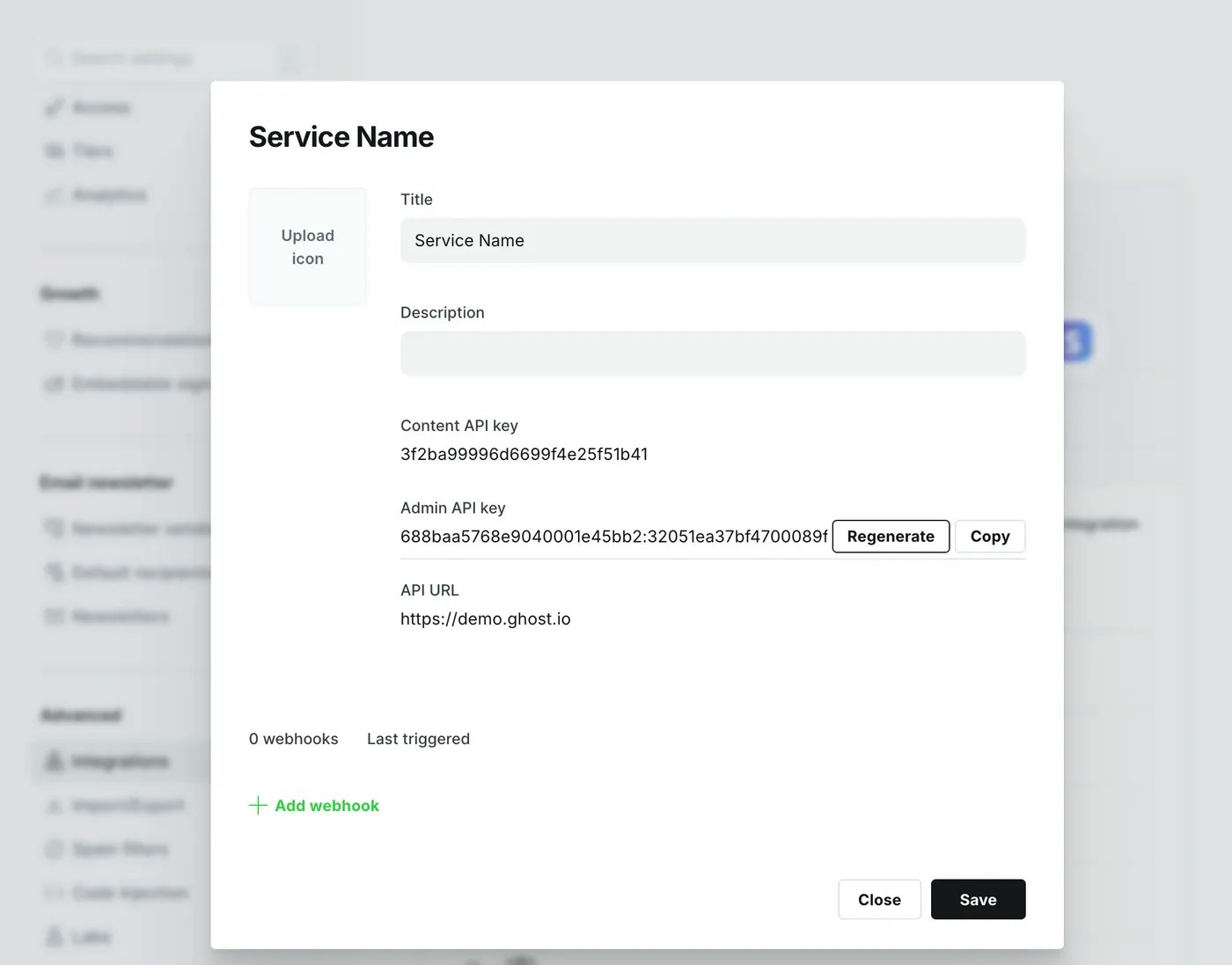
Content API keys are provided via a query parameter in the URL. These keys are safe for use in browsers and other insecure environments, as they only ever provide access to public data. Sites in private mode should consider where they share any keys they create.
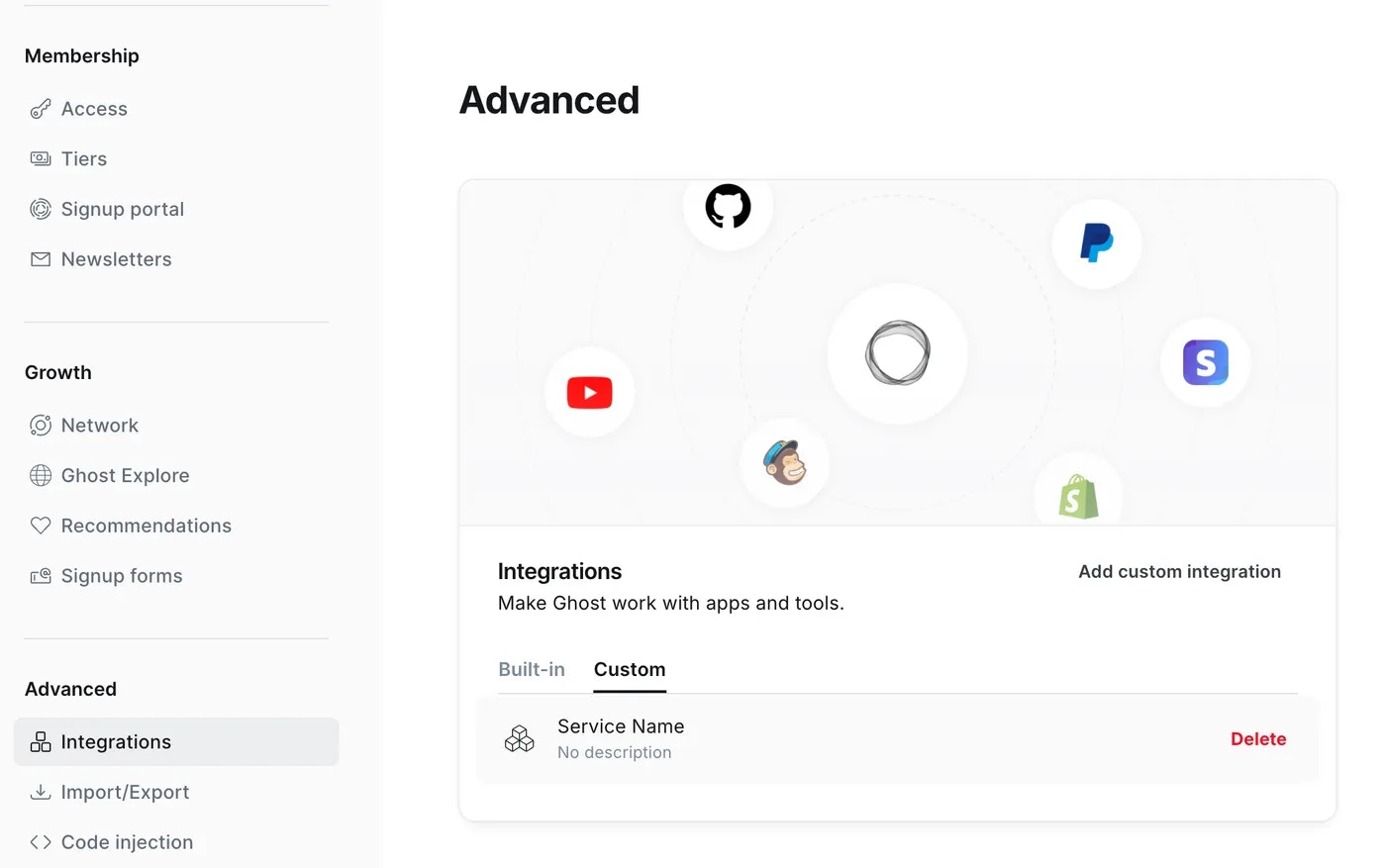
Obtain the Content API URL and key by creating a new `Custom Integration` under the **Integrations** screen in Ghost Admin.
 ### Accept-Version Header
`Accept-Version: v{major}.{minor}`
Use the `Accept-Version` header to indicate the minimum version of Ghost’s API to operate with. See [API Versioning](/faq/api-versioning/) for more details.
### Working Example
```bash theme={"dark"}
# cURL
# Real endpoint - copy and paste to see!
curl -H "Accept-Version: v6.0" "https://demo.ghost.io/ghost/api/content/posts/?key=22444f78447824223cefc48062"
```
***
## Endpoints
The Content API provides access to Posts, Pages, Tags, Authors, Tiers, and Settings. All endpoints return JSON and are considered [stable](/faq/api-versioning/).
### Working Example
| Verb | Path | Method |
| ---- | ---------------------------------------------- | --------------------- |
| GET | [/posts/](/content-api/posts) | Browse posts |
| GET | [/posts/\{id}/](/content-api/posts) | Read a post by ID |
| GET | [/posts/slug/\{slug}/](/content-api/posts) | Read a post by slug |
| GET | [/authors/](/content-api/authors) | Browse authors |
| GET | [/authors/\{id}/](/content-api/authors) | Read an author by ID |
| GET | [/authors/slug/\{slug}/](/content-api/authors) | Read a author by slug |
| GET | [/tags/](/content-api/tags) | Browse tags |
| GET | [/tags/\{id}/](/content-api/tags) | Read a tag by ID |
| GET | [/tags/slug/\{slug}/](/content-api/tags) | Read a tag by slug |
| GET | [/pages/](/content-api/pages) | Browse pages |
| GET | [/pages/\{id}/](/content-api/pages) | Read a page by ID |
| GET | [/pages/slug/\{slug}/](/content-api/pages) | Read a page by slug |
| GET | [/tiers/](/content-api/tiers) | Browse tiers |
| GET | [/settings/](/content-api/settings) | Browse settings |
The Content API supports two types of request: Browse and Read. Browse endpoints allow you to fetch lists of resources, whereas Read endpoints allow you to fetch a single resource.
***
## Resources
The API will always return valid JSON in the same structure:
```json theme={"dark"}
{
"resource_type": [{
...
}],
"meta": {}
}
```
* `resource_type`: will always match the resource name in the URL. All resources are returned wrapped in an array, with the exception of `/site/` and `/settings/`.
* `meta`: contains [pagination](/content-api/pagination) information for browse requests.
### Accept-Version Header
`Accept-Version: v{major}.{minor}`
Use the `Accept-Version` header to indicate the minimum version of Ghost’s API to operate with. See [API Versioning](/faq/api-versioning/) for more details.
### Working Example
```bash theme={"dark"}
# cURL
# Real endpoint - copy and paste to see!
curl -H "Accept-Version: v6.0" "https://demo.ghost.io/ghost/api/content/posts/?key=22444f78447824223cefc48062"
```
***
## Endpoints
The Content API provides access to Posts, Pages, Tags, Authors, Tiers, and Settings. All endpoints return JSON and are considered [stable](/faq/api-versioning/).
### Working Example
| Verb | Path | Method |
| ---- | ---------------------------------------------- | --------------------- |
| GET | [/posts/](/content-api/posts) | Browse posts |
| GET | [/posts/\{id}/](/content-api/posts) | Read a post by ID |
| GET | [/posts/slug/\{slug}/](/content-api/posts) | Read a post by slug |
| GET | [/authors/](/content-api/authors) | Browse authors |
| GET | [/authors/\{id}/](/content-api/authors) | Read an author by ID |
| GET | [/authors/slug/\{slug}/](/content-api/authors) | Read a author by slug |
| GET | [/tags/](/content-api/tags) | Browse tags |
| GET | [/tags/\{id}/](/content-api/tags) | Read a tag by ID |
| GET | [/tags/slug/\{slug}/](/content-api/tags) | Read a tag by slug |
| GET | [/pages/](/content-api/pages) | Browse pages |
| GET | [/pages/\{id}/](/content-api/pages) | Read a page by ID |
| GET | [/pages/slug/\{slug}/](/content-api/pages) | Read a page by slug |
| GET | [/tiers/](/content-api/tiers) | Browse tiers |
| GET | [/settings/](/content-api/settings) | Browse settings |
The Content API supports two types of request: Browse and Read. Browse endpoints allow you to fetch lists of resources, whereas Read endpoints allow you to fetch a single resource.
***
## Resources
The API will always return valid JSON in the same structure:
```json theme={"dark"}
{
"resource_type": [{
...
}],
"meta": {}
}
```
* `resource_type`: will always match the resource name in the URL. All resources are returned wrapped in an array, with the exception of `/site/` and `/settings/`.
* `meta`: contains [pagination](/content-api/pagination) information for browse requests.