> ## Documentation Index
> Fetch the complete documentation index at: https://docs.ghost.org/llms.txt
> Use this file to discover all available pages before exploring further.
# Overview
> It’s possible to create and manage your content using the Ghost Admin API. Our content management interface, Ghost Admin, uses the admin API - which means that everything Ghost Admin can do is also possible with the API, and a whole lot more!
***
Secure authentication is available either as a user with role-based permissions, or as an integration with a single standard set of permissions designed to support common publishing workflows.
The API is RESTful with predictable resource URLs, standard HTTP verbs, response codes and authentication used throughout. Requests and responses are JSON-encoded with consistent patterns and inline relations and responses are customisable using powerful query parameters.
## API Clients
### JavaScript Client Library
We’ve developed an [API client for JavaScript](/admin-api/javascript/), that simplifies authenticating with the admin API, and makes reading and writing data a breeze. The client is designed for use with integrations, supporting token authentication and the endpoints available to integrations.
## Structure
### Base URL
`https://{admin_domain}/ghost/api/admin/`
All admin API requests start with this base URL. Your admin domain can be different to your main domain, and may include a subdirectory. Using the correct domain and protocol are critical to getting consistent behaviour, particularly when dealing with CORS in the browser. All Ghost(Pro) blogs have a `*.ghost.io` domain as their admin domain and require https.
### Accept-Version Header
`Accept-Version: v{major}.{minor}`
Use the `Accept-Version` header to indicate the minimum version of Ghost’s API to operate with. See [API Versioning](/faq/api-versioning/) for more details.
### JSON Format
The API uses a consistent JSON structure for all requests and responses:
```json theme={"dark"}
{
"resource_type": [{
...
}],
"meta": {}
}
```
* `resource_type`: will always match the resource name in the URL. All resources are returned wrapped in an array, with the exception of `/site/` and `/settings/`.
* `meta`: contains [pagination](/content-api/pagination) information for browse requests.
#### Composing requests
When composing JSON payloads to send to the API as POST or PUT requests, you must always use this same format, unless the documentation for an endpoint says otherwise.
Requests with JSON payloads require the `Content-Type: application/json` header. Most request libraries have JSON-specific handling that will do this for you.
### Pagination
All browse endpoints are paginated, returning 15 records by default. You can use the [page](#page) and [limit](#limit) parameters to move through the pages of records. The response object contains a `meta.pagination` key with information on the current location within the records:
```json theme={"dark"}
"meta": {
"pagination": {
"page": 1,
"limit": 2,
"pages": 1,
"total": 1,
"next": null,
"prev": null
}
}
```
### Parameters
Query parameters provide fine-grained control over responses. All endpoints accept `include` and `fields`. Browse endpoints additionally accept `filter`, `limit`, `page` and `order`. Some endpoints have their own specific parameters.
The values provided as query parameters MUST be url encoded when used directly. The [client library](/admin-api/javascript/) will handle this for you.
For more details see the [Content API](/content-api/parameters).
### Filtering
See the [Content API](/content-api/filtering).
### Errors
See the [Content API](/content-api/errors).
## Authentication
There are three methods for authenticating with the Admin API: [integration token authentication](#token-authentication), [staff access token authentication](#staff-access-token-authentication) and [user authentication](#user-authentication). Most applications integrating with the Ghost Admin API should use one of the token authentication methods.
The JavaScript Admin API Client supports token authentication and staff access token authentication.
### Choosing an authentication method
**Integration Token authentication** is intended for integrations that handle common workflows, such as publishing new content, or sharing content to other platforms.
Using tokens, you authenticate as an integration. Each integration can have associated API keys & webhooks and are able to perform API requests independently of users. Admin API keys are used to generate short-lived single-use JSON Web Tokens (JWTs), which are then used to authenticate a request. The API Key is secret, and therefore this authentication method is only suitable for secure server side environments.
**Staff access token authentication** is intended for clients where different users login and manage various resources as themselves, without having to share their password.
Using a token found in a user’s settings page you authenticate as a specific user with their role-based permissions. You can use this token the same way you would use an integration token.
**User authentication** is intended for fully-fledged clients where different users login and manage various resources as themselves.
Using an email address and password, you authenticate as a specific user with their role-based permissions. Via the session API, credentials are swapped for a cookie-based session, which is then used to authenticate further API requests. Provided that passwords are entered securely, user-authentication is safe for use in the browser. User authentication requires support for second factor authentication codes.
### Permissions
Integrations have a restricted set of fixed permissions allowing access to certain endpoints e.g. `GET /users/` or `POST /posts/`. The full set of endpoints that integrations can access are those listed as [endpoints](#endpoints) on this page.
User permissions (whether using staff tokens or user authentication) are dependent entirely on their role. You can find more details in the [team management guide](https://ghost.org/help/managing-your-team/). Authenticating as a user with the Owner or Admin role will give access to the full set of API endpoints. Many endpoints can be discovered by inspecting the requests made by Ghost Admin, the [endpoints](#endpoints) listed on this page are those stable enough to document.
There are two exceptions: Staff tokens cannot transfer ownership or delete all content.
### Token Authentication
Token authentication is a simple, secure authentication mechanism using JSON Web Tokens (JWTs). Each integration and staff user is issued with an admin API key, which is used to generate a JWT token and then provided to the API via the standard HTTP Authorization header.
The admin API key must be kept private, therefore token authentication is not suitable for browsers or other insecure environments, unlike the Content API key.
#### Key
Admin API keys can be obtained by creating a new `Custom Integration` under the Integrations screen in Ghost Admin. Keys for individual users can be found on their respective profile page.
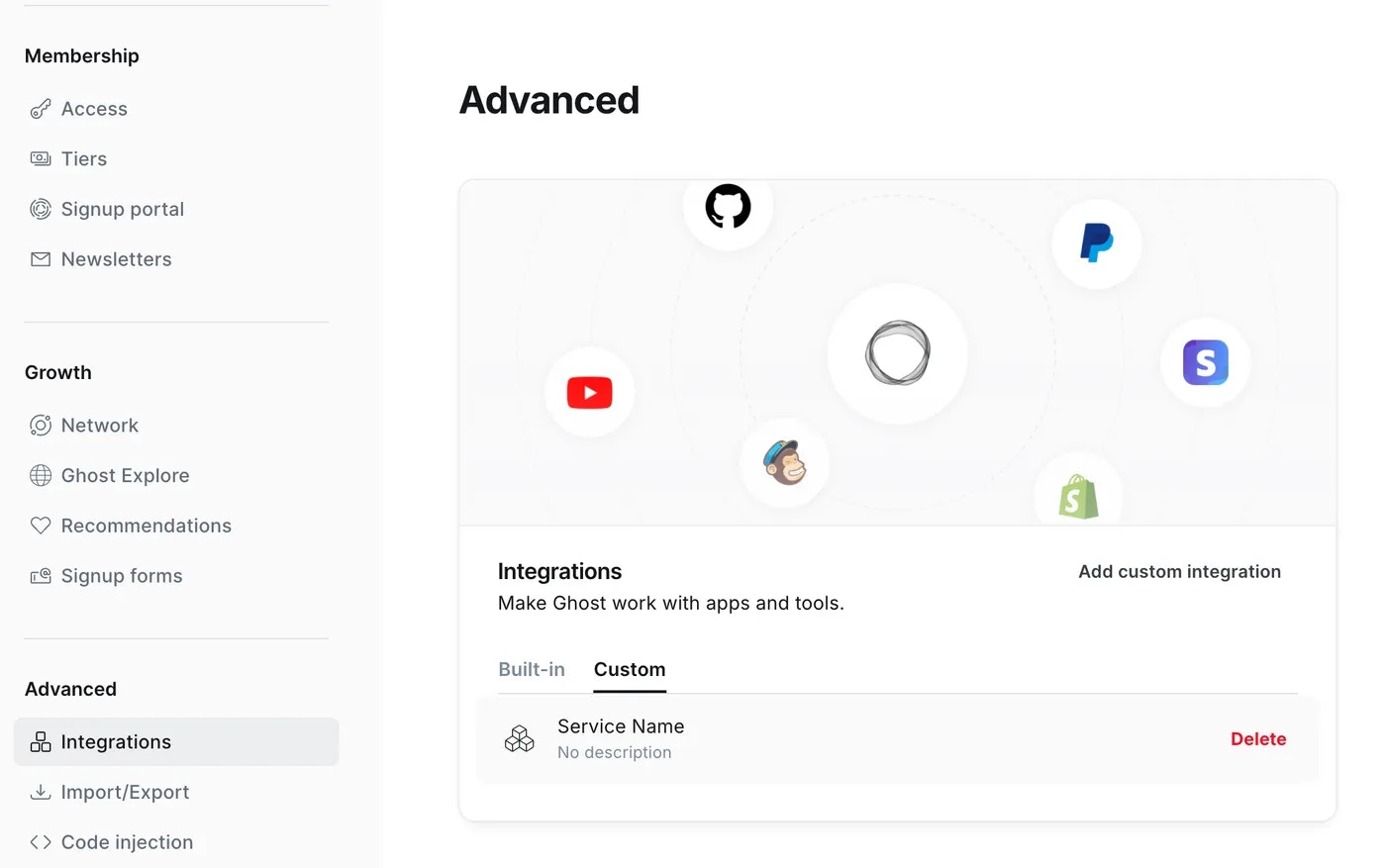
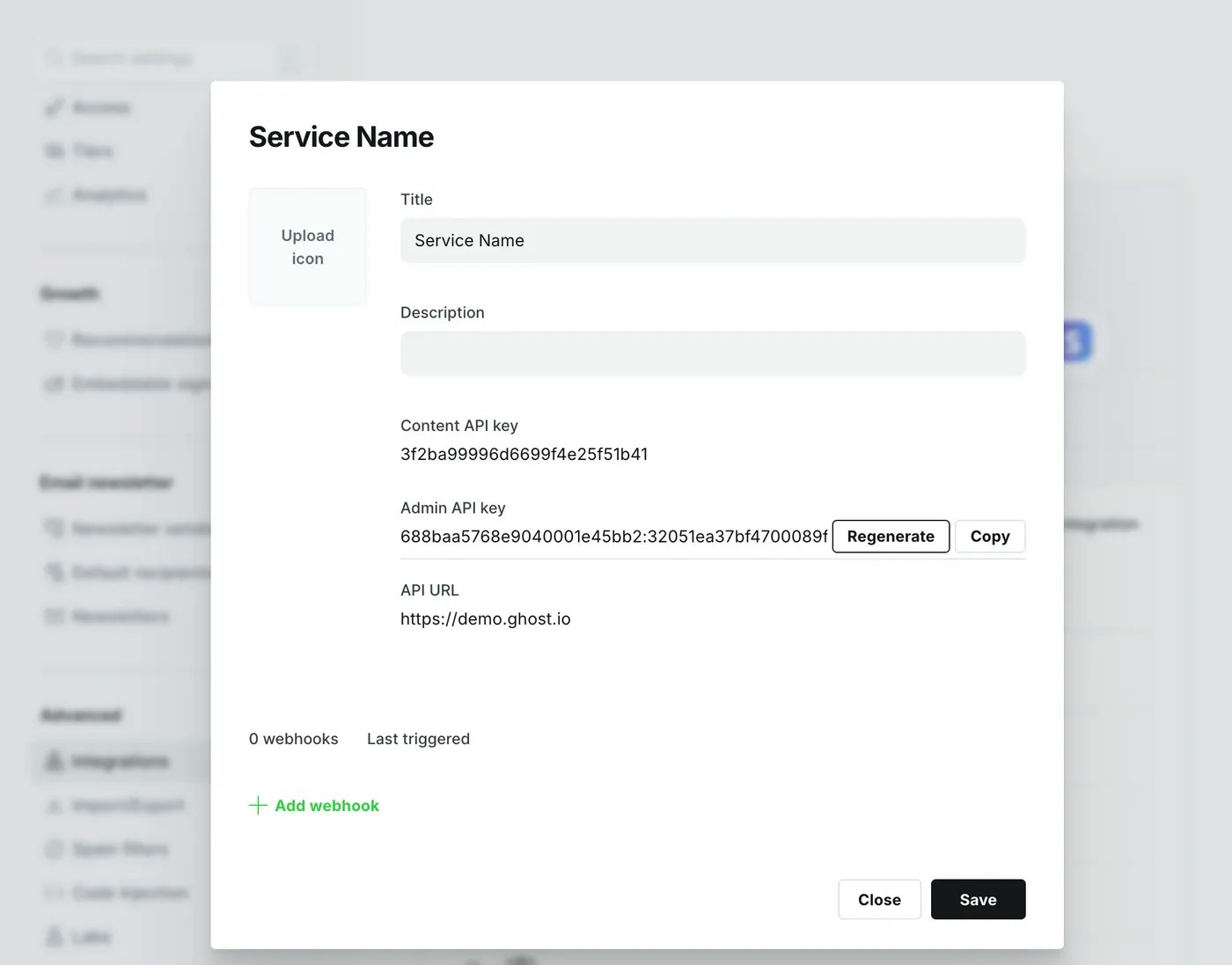 Admin API keys are made up of an id and secret, separated by a colon. These values are used separately to get a signed JWT token, which is used in the Authorization header of the request:
```bash theme={"dark"}
curl -H "Authorization: Ghost $token" -H "Accept-Version: $version" https://{admin_domain}/ghost/api/admin/{resource}/
```
The Admin API JavaScript client handles all the technical details of generating a JWT from an admin API key, meaning you only have to provide your url, version and key to start making requests.
#### Token Generation
If you’re using a language other than JavaScript, or are not using our client library, you’ll need to generate the tokens yourself. It is not safe to swap keys for tokens in the browser, or in any other insecure environment.
There are a myriad of [libraries](https://jwt.io/#libraries) available for generating JWTs in different environments.
JSON Web Tokens are made up of a header, a payload and a secret. The values needed for the header and payload are:
```json theme={"dark"}
// Header
{
"alg": "HS256",
"kid": {id}, // ID from your API key
"typ": "JWT"
}
```
```json theme={"dark"}
// Payload
{
// Timestamps are seconds sine the unix epoch, not milliseconds
"exp": {timestamp}, // Max 5 minutes after 'now'
"iat": {timestamp}, // 'now' (max 5 minutes after 'exp')
"aud": "/admin/"
}
```
The libraries on [https://jwt.io](https://jwt.io) all work slightly differently, but all of them allow you to specify the above required values, including setting the signing algorithm to the required HS-256. Where possible, the API will provide specific error messages when required values are missing or incorrect.
Regardless of language, you’ll need to:
1. Split the API key by the `:` into an `id` and a `secret`
2. Decode the hexadecimal secret into the original binary byte array
3. Pass these values to your JWT library of choice, ensuring that the header and payload are correct.
#### Token Generation Examples
These examples show how to generate a valid JWT in various languages & JWT libraries. The bash example shows step-by-step how to create a token without using a library.
```bash Bash (cURL) theme={"dark"}
#!/usr/bin/env bash
# Admin API key goes here
KEY="YOUR_ADMIN_API_KEY"
# Split the key into ID and SECRET
TMPIFS=$IFS
IFS=':' read ID SECRET <<< "$KEY"
IFS=$TMPIFS
# Prepare header and payload
NOW=$(date +'%s')
FIVE_MINS=$(($NOW + 300))
HEADER="{\"alg\": \"HS256\",\"typ\": \"JWT\", \"kid\": \"$ID\"}"
PAYLOAD="{\"iat\":$NOW,\"exp\":$FIVE_MINS,\"aud\": \"/admin/\"}"
# Helper function for performing base64 URL encoding
base64_url_encode() {
declare input=${1:-$( console.log(response))
.catch(error => console.error(error));
```
```js JavaScript theme={"dark"}
// Create a token without the client
const jwt = require('jsonwebtoken');
const axios = require('axios');
// Admin API key goes here
const key = 'YOUR_ADMIN_API_KEY';
// Split the key into ID and SECRET
const [id, secret] = key.split(':');
// Create the token (including decoding secret)
const token = jwt.sign({}, Buffer.from(secret, 'hex'), {
keyid: id,
algorithm: 'HS256',
expiresIn: '5m',
audience: `/admin/`
});
// Make an authenticated request to create a post
const url = 'http://localhost:2368/ghost/api/admin/posts/';
const headers = { Authorization: `Ghost ${token}` };
const payload = { posts: [{ title: 'Hello World' }] };
axios.post(url, payload, { headers })
.then(response => console.log(response))
.catch(error => console.error(error));
```
```ruby Ruby theme={"dark"}
require 'httparty'
require 'jwt'
# Admin API key goes here
key = 'YOUR_ADMIN_API_KEY'
# Split the key into ID and SECRET
id, secret = key.split(':')
# Prepare header and payload
iat = Time.now.to_i
header = {alg: 'HS256', typ: 'JWT', kid: id}
payload = {
iat: iat,
exp: iat + 5 * 60,
aud: '/admin/'
}
# Create the token (including decoding secret)
token = JWT.encode payload, [secret].pack('H*'), 'HS256', header
# Make an authenticated request to create a post
url = 'http://localhost:2368/ghost/api/admin/posts/'
headers = {Authorization: "Ghost #{token}", 'Accept-Version': "v4.0"}
body = {posts: [{title: 'Hello World'}]}
puts HTTParty.post(url, body: body, headers: headers)
```
```py Python theme={"dark"}
import requests # pip install requests
import jwt # pip install pyjwt
from datetime import datetime as date
# Admin API key goes here
key = 'YOUR_ADMIN_API_KEY'
# Split the key into ID and SECRET
id, secret = key.split(':')
# Prepare header and payload
iat = int(date.now().timestamp())
header = {'alg': 'HS256', 'typ': 'JWT', 'kid': id}
payload = {
'iat': iat,
'exp': iat + 5 * 60,
'aud': '/admin/'
}
# Create the token (including decoding secret)
token = jwt.encode(payload, bytes.fromhex(secret), algorithm='HS256', headers=header)
# Make an authenticated request to create a post
url = 'http://localhost:2368/ghost/api/admin/posts/'
headers = {'Authorization': 'Ghost {}'.format(token)}
body = {'posts': [{'title': 'Hello World'}]}
r = requests.post(url, json=body, headers=headers)
print(r)
```
### Staff access token authentication
Staff access token authentication is a simple, secure authentication mechanism using JSON Web Tokens (JWTs) to authenticate as a user. Each user can create and refresh their own token, which is used to generate a JWT token and then provided to the API via the standard HTTP Authorization header. For more information on usage, please refer to the [token authentication section](#token-authentication).
The staff access token must be kept private, therefore staff access token authentication is not suitable for browsers or other insecure environments.
### User Authentication
User Authentication is an advanced, session-based authentication method that should only be used for applications where the user is present and able to provide their credentials.
Authenticating as a user requires an application to collect a user’s email and password. These credentials are then swapped for a cookie, and the cookie is then used to maintain a session.
Requests to create a session may require new device verification or two-factor auth. In this case an auth code is sent to the user’s email address, and that must be provided in order to verify the session.
#### Creating a Session
The session and authentication endpoints have custom payloads, different to the standard JSON resource format.
```js theme={"dark"}
POST /admin/session/
```
**Request**
To create a new session, send a username and password to the sessions endpoint, in this format:
```json theme={"dark"}
// POST /admin/session/
{
"username": "{email address}",
"password": "{password}"
}
```
This request should also have an Origin header. See [CSRF protection](#csrf-protection) for details.
**Success Response**
`201 Created`: A successful session creation will return HTTP `201` response with an empty body and a `set-cookie` header, in the following format:
```text theme={"dark"}
set-cookie: ghost-admin-api-session={session token}; Path=/ghost; Expires=Mon, 26 Aug 2019 19:14:07 GMT; HttpOnly; SameSite=Lax
```
**2FA Response**
`403 Needs2FAError`: In many cases, session creation will require an auth code to be provided. In this case you’ll get a 403 and the message `User must verify session to login`.
This response still has the `set-cookie` header in the above format, which should be used in the request to provide the token:
**Verification Request**
To send the authentication token
```json theme={"dark"}
// PUT /admin/session/verify/
{
"token": "{auth code}"
}
```
To request an auth token to be resent:
```json theme={"dark"}
// POST /admin/session/verify/
{}
```
#### Making authenticated API requests
The provided session cookie should be provided with every subsequent API request:
* When making the request from a browser using the `fetch` API, pass `credentials: 'include'` to ensure cookies are sent.
* When using XHR you should set the `withCredentials` property of the xhr to `true`
* When using cURL you can use the `--cookie` and `--cookie-jar` options to store and send cookies from a text file.
**CSRF Protection**
Session-based requests must also include either an Origin (preferred) or a Referer header. The value of these headers is checked against the original session creation requests, in order to prevent Cross-Site Request Forgery (CSRF) in a browser environment. In a browser environment, these headers are handled automatically. For server-side or native apps, the Origin header should be sent with an identifying URL as the value.
#### Session-based Examples
```bash theme={"dark"}
# cURL
# Create a session, and store the cookie in ghost-cookie.txt
curl -c ghost-cookie.txt -d username=me@site.com -d password=secretpassword \
-H "Origin: https://myappsite.com" \
-H "Accept-Version: v3.0" \
https://demo.ghost.io/ghost/api/admin/session/
# Use the session cookie to create a post
curl -b ghost-cookie.txt \
-d '{"posts": [{"title": "Hello World"}]}' \
-H "Content-Type: application/json" \
-H "Accept-Version: v3.0" \
-H "Origin: https://myappsite.com" \
https://demo.ghost.io/ghost/api/admin/posts/
```
## Endpoints
These are the endpoints & methods currently available to integrations. More endpoints are available through user authentication. Each endpoint has a stability index, see [versioning](/faq/api-versioning) for more information.
| Resource | Methods | Stability |
| ---------------------------------------- | ------------------------------------- | --------- |
| [/posts/](/admin-api/#posts) | Browse, Read, Edit, Add, Copy, Delete | Stable |
| [/pages/](/admin-api/#pages) | Browse, Read, Edit, Add, Copy, Delete | Stable |
| /tags/ | Browse, Read, Edit, Add, Delete | Stable |
| [/tiers/](/admin-api/#tiers) | Browse, Read, Edit, Add | Stable |
| [/newsletters/](/admin-api/#newsletters) | Browse, Read, Edit, Add | Stable |
| [/offers/](/admin-api/#offers) | Browse, Read, Edit, Add | Stable |
| [/members/](/admin-api/#members) | Browse, Read, Edit, Add | Stable |
| [/users/](/admin-api/#users) | Browse, Read | Stable |
| [/images/](/admin-api/#images) | Upload | Stable |
| [/themes/](/admin-api/#themes)[]() | Upload, Activate | Stable |
| [/site/](/admin-api/#site) | Read | Stable |
| [/webhooks/](/admin-api/#webhooks) | Edit, Add, Delete | Stable |
Admin API keys are made up of an id and secret, separated by a colon. These values are used separately to get a signed JWT token, which is used in the Authorization header of the request:
```bash theme={"dark"}
curl -H "Authorization: Ghost $token" -H "Accept-Version: $version" https://{admin_domain}/ghost/api/admin/{resource}/
```
The Admin API JavaScript client handles all the technical details of generating a JWT from an admin API key, meaning you only have to provide your url, version and key to start making requests.
#### Token Generation
If you’re using a language other than JavaScript, or are not using our client library, you’ll need to generate the tokens yourself. It is not safe to swap keys for tokens in the browser, or in any other insecure environment.
There are a myriad of [libraries](https://jwt.io/#libraries) available for generating JWTs in different environments.
JSON Web Tokens are made up of a header, a payload and a secret. The values needed for the header and payload are:
```json theme={"dark"}
// Header
{
"alg": "HS256",
"kid": {id}, // ID from your API key
"typ": "JWT"
}
```
```json theme={"dark"}
// Payload
{
// Timestamps are seconds sine the unix epoch, not milliseconds
"exp": {timestamp}, // Max 5 minutes after 'now'
"iat": {timestamp}, // 'now' (max 5 minutes after 'exp')
"aud": "/admin/"
}
```
The libraries on [https://jwt.io](https://jwt.io) all work slightly differently, but all of them allow you to specify the above required values, including setting the signing algorithm to the required HS-256. Where possible, the API will provide specific error messages when required values are missing or incorrect.
Regardless of language, you’ll need to:
1. Split the API key by the `:` into an `id` and a `secret`
2. Decode the hexadecimal secret into the original binary byte array
3. Pass these values to your JWT library of choice, ensuring that the header and payload are correct.
#### Token Generation Examples
These examples show how to generate a valid JWT in various languages & JWT libraries. The bash example shows step-by-step how to create a token without using a library.
```bash Bash (cURL) theme={"dark"}
#!/usr/bin/env bash
# Admin API key goes here
KEY="YOUR_ADMIN_API_KEY"
# Split the key into ID and SECRET
TMPIFS=$IFS
IFS=':' read ID SECRET <<< "$KEY"
IFS=$TMPIFS
# Prepare header and payload
NOW=$(date +'%s')
FIVE_MINS=$(($NOW + 300))
HEADER="{\"alg\": \"HS256\",\"typ\": \"JWT\", \"kid\": \"$ID\"}"
PAYLOAD="{\"iat\":$NOW,\"exp\":$FIVE_MINS,\"aud\": \"/admin/\"}"
# Helper function for performing base64 URL encoding
base64_url_encode() {
declare input=${1:-$( console.log(response))
.catch(error => console.error(error));
```
```js JavaScript theme={"dark"}
// Create a token without the client
const jwt = require('jsonwebtoken');
const axios = require('axios');
// Admin API key goes here
const key = 'YOUR_ADMIN_API_KEY';
// Split the key into ID and SECRET
const [id, secret] = key.split(':');
// Create the token (including decoding secret)
const token = jwt.sign({}, Buffer.from(secret, 'hex'), {
keyid: id,
algorithm: 'HS256',
expiresIn: '5m',
audience: `/admin/`
});
// Make an authenticated request to create a post
const url = 'http://localhost:2368/ghost/api/admin/posts/';
const headers = { Authorization: `Ghost ${token}` };
const payload = { posts: [{ title: 'Hello World' }] };
axios.post(url, payload, { headers })
.then(response => console.log(response))
.catch(error => console.error(error));
```
```ruby Ruby theme={"dark"}
require 'httparty'
require 'jwt'
# Admin API key goes here
key = 'YOUR_ADMIN_API_KEY'
# Split the key into ID and SECRET
id, secret = key.split(':')
# Prepare header and payload
iat = Time.now.to_i
header = {alg: 'HS256', typ: 'JWT', kid: id}
payload = {
iat: iat,
exp: iat + 5 * 60,
aud: '/admin/'
}
# Create the token (including decoding secret)
token = JWT.encode payload, [secret].pack('H*'), 'HS256', header
# Make an authenticated request to create a post
url = 'http://localhost:2368/ghost/api/admin/posts/'
headers = {Authorization: "Ghost #{token}", 'Accept-Version': "v4.0"}
body = {posts: [{title: 'Hello World'}]}
puts HTTParty.post(url, body: body, headers: headers)
```
```py Python theme={"dark"}
import requests # pip install requests
import jwt # pip install pyjwt
from datetime import datetime as date
# Admin API key goes here
key = 'YOUR_ADMIN_API_KEY'
# Split the key into ID and SECRET
id, secret = key.split(':')
# Prepare header and payload
iat = int(date.now().timestamp())
header = {'alg': 'HS256', 'typ': 'JWT', 'kid': id}
payload = {
'iat': iat,
'exp': iat + 5 * 60,
'aud': '/admin/'
}
# Create the token (including decoding secret)
token = jwt.encode(payload, bytes.fromhex(secret), algorithm='HS256', headers=header)
# Make an authenticated request to create a post
url = 'http://localhost:2368/ghost/api/admin/posts/'
headers = {'Authorization': 'Ghost {}'.format(token)}
body = {'posts': [{'title': 'Hello World'}]}
r = requests.post(url, json=body, headers=headers)
print(r)
```
### Staff access token authentication
Staff access token authentication is a simple, secure authentication mechanism using JSON Web Tokens (JWTs) to authenticate as a user. Each user can create and refresh their own token, which is used to generate a JWT token and then provided to the API via the standard HTTP Authorization header. For more information on usage, please refer to the [token authentication section](#token-authentication).
The staff access token must be kept private, therefore staff access token authentication is not suitable for browsers or other insecure environments.
### User Authentication
User Authentication is an advanced, session-based authentication method that should only be used for applications where the user is present and able to provide their credentials.
Authenticating as a user requires an application to collect a user’s email and password. These credentials are then swapped for a cookie, and the cookie is then used to maintain a session.
Requests to create a session may require new device verification or two-factor auth. In this case an auth code is sent to the user’s email address, and that must be provided in order to verify the session.
#### Creating a Session
The session and authentication endpoints have custom payloads, different to the standard JSON resource format.
```js theme={"dark"}
POST /admin/session/
```
**Request**
To create a new session, send a username and password to the sessions endpoint, in this format:
```json theme={"dark"}
// POST /admin/session/
{
"username": "{email address}",
"password": "{password}"
}
```
This request should also have an Origin header. See [CSRF protection](#csrf-protection) for details.
**Success Response**
`201 Created`: A successful session creation will return HTTP `201` response with an empty body and a `set-cookie` header, in the following format:
```text theme={"dark"}
set-cookie: ghost-admin-api-session={session token}; Path=/ghost; Expires=Mon, 26 Aug 2019 19:14:07 GMT; HttpOnly; SameSite=Lax
```
**2FA Response**
`403 Needs2FAError`: In many cases, session creation will require an auth code to be provided. In this case you’ll get a 403 and the message `User must verify session to login`.
This response still has the `set-cookie` header in the above format, which should be used in the request to provide the token:
**Verification Request**
To send the authentication token
```json theme={"dark"}
// PUT /admin/session/verify/
{
"token": "{auth code}"
}
```
To request an auth token to be resent:
```json theme={"dark"}
// POST /admin/session/verify/
{}
```
#### Making authenticated API requests
The provided session cookie should be provided with every subsequent API request:
* When making the request from a browser using the `fetch` API, pass `credentials: 'include'` to ensure cookies are sent.
* When using XHR you should set the `withCredentials` property of the xhr to `true`
* When using cURL you can use the `--cookie` and `--cookie-jar` options to store and send cookies from a text file.
**CSRF Protection**
Session-based requests must also include either an Origin (preferred) or a Referer header. The value of these headers is checked against the original session creation requests, in order to prevent Cross-Site Request Forgery (CSRF) in a browser environment. In a browser environment, these headers are handled automatically. For server-side or native apps, the Origin header should be sent with an identifying URL as the value.
#### Session-based Examples
```bash theme={"dark"}
# cURL
# Create a session, and store the cookie in ghost-cookie.txt
curl -c ghost-cookie.txt -d username=me@site.com -d password=secretpassword \
-H "Origin: https://myappsite.com" \
-H "Accept-Version: v3.0" \
https://demo.ghost.io/ghost/api/admin/session/
# Use the session cookie to create a post
curl -b ghost-cookie.txt \
-d '{"posts": [{"title": "Hello World"}]}' \
-H "Content-Type: application/json" \
-H "Accept-Version: v3.0" \
-H "Origin: https://myappsite.com" \
https://demo.ghost.io/ghost/api/admin/posts/
```
## Endpoints
These are the endpoints & methods currently available to integrations. More endpoints are available through user authentication. Each endpoint has a stability index, see [versioning](/faq/api-versioning) for more information.
| Resource | Methods | Stability |
| ---------------------------------------- | ------------------------------------- | --------- |
| [/posts/](/admin-api/#posts) | Browse, Read, Edit, Add, Copy, Delete | Stable |
| [/pages/](/admin-api/#pages) | Browse, Read, Edit, Add, Copy, Delete | Stable |
| /tags/ | Browse, Read, Edit, Add, Delete | Stable |
| [/tiers/](/admin-api/#tiers) | Browse, Read, Edit, Add | Stable |
| [/newsletters/](/admin-api/#newsletters) | Browse, Read, Edit, Add | Stable |
| [/offers/](/admin-api/#offers) | Browse, Read, Edit, Add | Stable |
| [/members/](/admin-api/#members) | Browse, Read, Edit, Add | Stable |
| [/users/](/admin-api/#users) | Browse, Read | Stable |
| [/images/](/admin-api/#images) | Upload | Stable |
| [/themes/](/admin-api/#themes)[]() | Upload, Activate | Stable |
| [/site/](/admin-api/#site) | Read | Stable |
| [/webhooks/](/admin-api/#webhooks) | Edit, Add, Delete | Stable |